User Onboarding and the Shortest Path to Action
How onboarding reduces friction, times commitments, and helps users follow through
User onboarding often succeeds in helping users understand a product. It can guide them to their first meaningful outcome and show how the product fits into their work. It can support return visits and even encourage repeated behavior.
And still, something tends to break.
Users intend to come back. They intend to continue. They intend to follow through on what they just learned. But when the moment arrives in their day, they do something else.
Not because they changed their mind, but because too much stands in the way between intention and action.
Most onboarding experiences try to solve this with more guidance: More steps, more explanations, and more structure. A more effective approach is to remove unnecessary steps and place the right actions at the right moment.
In the end, success is not defined by what users intend to do, but defined by what they actually do when the moment arrives.
The shortest path to action is what makes onboarding work.
Planning the First-Run Experience
To understand what that means in practice, it helps to start with a clear outcome.
Imagine a product that helps teams send structured weekly updates. Instead of collecting status across meetings, chat threads, and documents, everything is written once and shared clearly with the team.
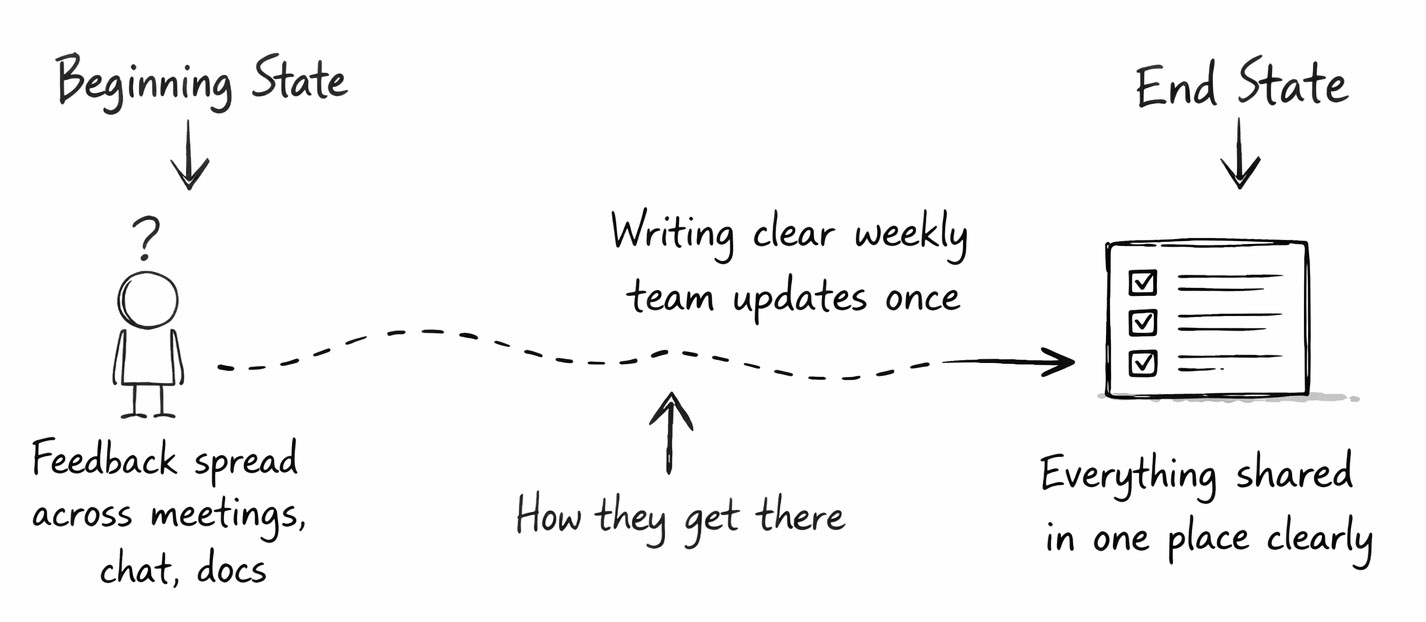
The improvement is straightforward. The first meaningful outcome is equally clear.
You send your first update.
That is the moment where the product delivers on its promise. It is the point where the user can see the result and recognize the value.
So the job of user onboarding is to get the user there as directly as possible.
Let’s map a first version of that journey.
- Confirm email
- Create workspace
- Invite team members
- Click “Create Update”
- Add sections
- Write content
- Save draft
- Choose recipients
- Send update
At first glance, each of these steps seems reasonable. They reflect how the system is structured and what it needs to function. But the user’s goal is not to complete steps. The goal is to send an update.
Every step introduces effort. Every step creates a moment where the user has to decide, hesitate, or stop. Even small steps accumulate into friction that prevents the outcome from ever happening.
Activity Is Not Progress
It is easy to mistake activity for progress. A user moving through a sequence of screens can feel like forward motion. Forms are filled out. Buttons are clicked. Steps are completed. But none of that matters unless it leads to the outcome the user came for.
Sending the update is progress.
Everything else is a means to that end.
When onboarding is designed around the steps themselves, it starts to optimize for completion of the flow rather than completion of the outcome. The result is an experience where users are busy, but not necessarily successful.
A more effective approach is to question every step. Not from the perspective of the system, but from the perspective of the outcome.
Does this step help the user get there right now?
If not, it likely belongs somewhere else.
Reducing the Path to the Outcome
When the flow is examined through the lens of the outcome, each step begins to reveal its true role. Some are essential. Others are simply placed too early.
Let’s go back to the original flow:
- Confirm email
- Create workspace
- Invite team members
- Click “Create Update”
- Add sections
- Write content
- Save draft
- Choose recipients
- Send update
Confirming an email supports account integrity, but it does not help the user send an update in that moment. It can happen later, when the user already has a reason to care.
Creating a workspace feels necessary, but it is largely structural. A default workspace can serve the user just as well at this stage.
Inviting team members introduces coordination and hesitation. It asks the user to involve others before they have even seen the result themselves.
These steps do not disappear, but they do not belong here.
Now the flow becomes:
Confirm emailCreate workspaceInvite team members- Click “Create Update”
- Add sections
- Write content
- Save draft
- Choose recipients
- Send update
Adding sections assumes the user needs to define structure before writing. A simple template can provide that structure without requiring effort.
Saving a draft is not a meaningful action for the user. It is something the system can handle automatically.
These steps can also move out of the way.
Now the flow looks like this:
Confirm emailCreate workspaceInvite team members- Click “Create Update”
Add sections- Write content
Save draft- Choose recipients
- Send update
Choosing recipients is important, but its timing matters. Asking the user who should receive the update before they have experienced what they are sending introduces unnecessary friction.
Rather than removing this step, it can be relocated.
Choosing recipients and inviting team members are closely related actions. Both are about sharing the outcome. Both become much easier once the user can see what they are about to send.
So instead of asking early, both actions can be combined into the moment where the user clicks “Send.” At that point, the user has written something. They can see it. The value is no longer abstract.
This is the right moment to ask for commitment.
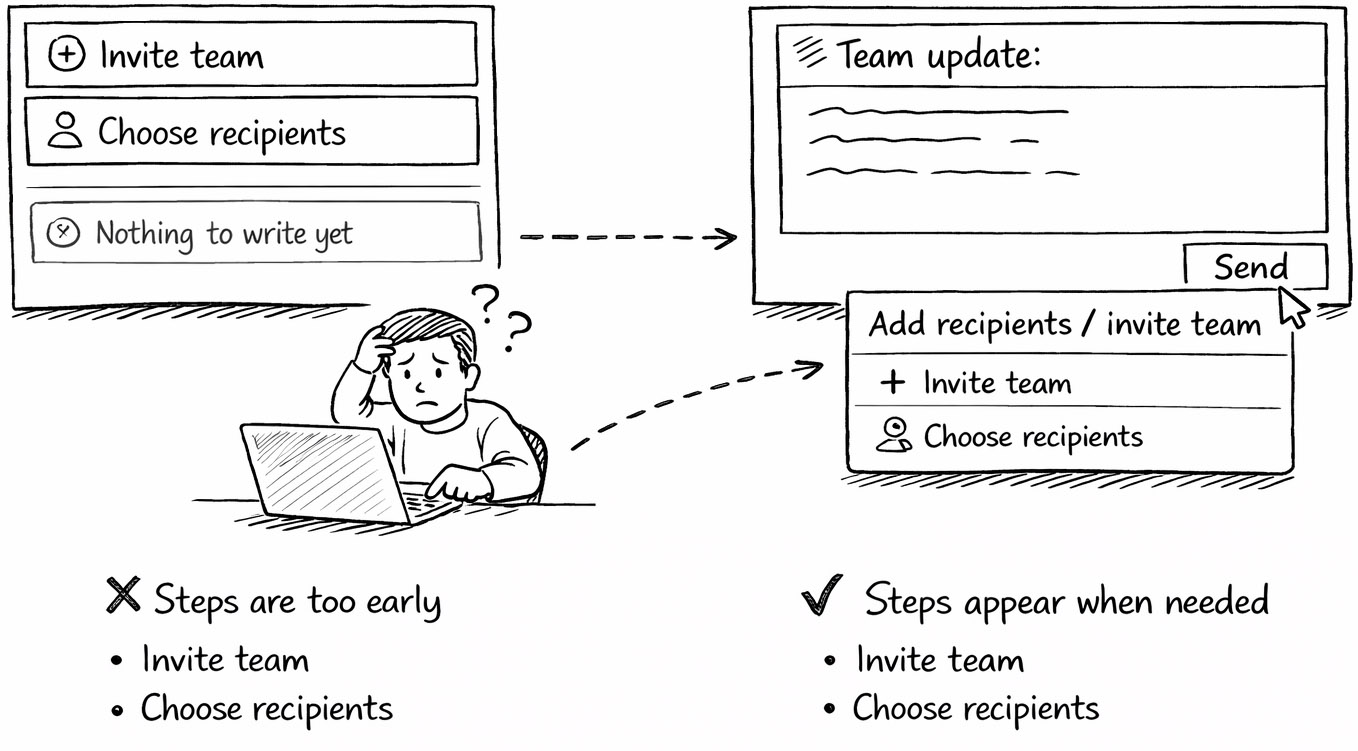
Now the flow becomes:
Confirm emailCreate workspaceInvite team members- Click “Create Update”
Add sections- Write content
Save draftChoose recipients- Send update
At this point, clicking “Create Update” stands out. It is still a decision point. It asks the user to begin.
That can also be removed.
Instead of asking the user to start, the product can simply start for them. An open editor. A preloaded template. A cursor ready to type.
Now the flow is reduced to its core:
Confirm emailCreate workspaceInvite team membersClick “Create Update”Add sections- Write content
Save draftChoose recipients- Send update
What remains is simple:
- Write the update.
- Send the update.
The outcome is unchanged, but the path is radically clearer. The user no longer has to navigate the product. They can act directly.
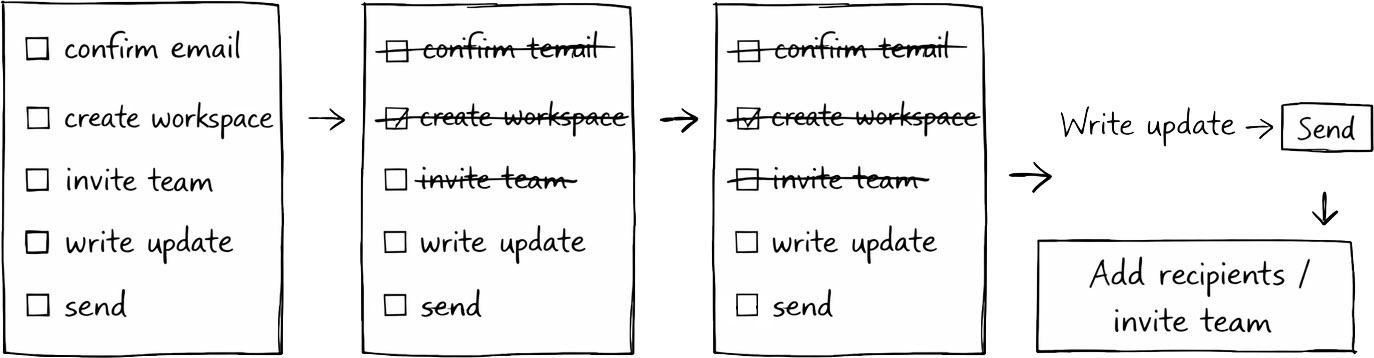
This shift changes more than the flow itself. It changes when the product asks something of the user. Instead of requiring commitment up front, the product allows the user to experience value first, and only then introduces the next step.
From a Simple Flow to a Real Moment
A simplified path increases the likelihood that a user completes the first action. It removes friction and reduces hesitation. But it does not guarantee that the user will return and repeat the behavior.
That depends on timing.
A user can complete onboarding and still never come back. Not because they did not see value, but because they never decided when to act again.
“I should send updates regularly” is a reasonable intention. But it has no anchor. It has no place in the user’s day. When the week unfolds, that intention competes with everything else that demands attention.
A plan changes that.
“If I finish my weekly team meeting, I will write and send the update.”
Now the action is tied to a specific situation. It has a clear trigger. When the meeting ends, the next step is already decided.
Connecting the Product to Real Moments
User onboarding should make these moments visible. Instead of focusing only on how the product works, it should show where it fits. It should connect the action to events that already exist in the user’s routine.
After a meeting. At the start of the day. Before wrapping up work.
These moments are stable. They happen regardless of the product. By linking the product to them, the action becomes easier to repeat.
The product moves from being something the user has to remember to something they expect.
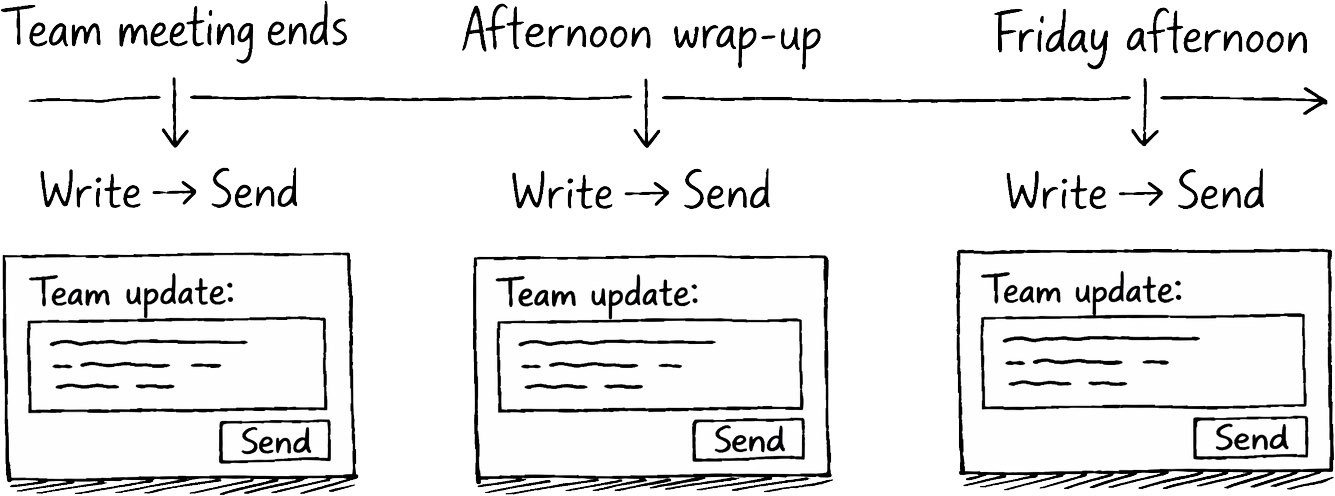
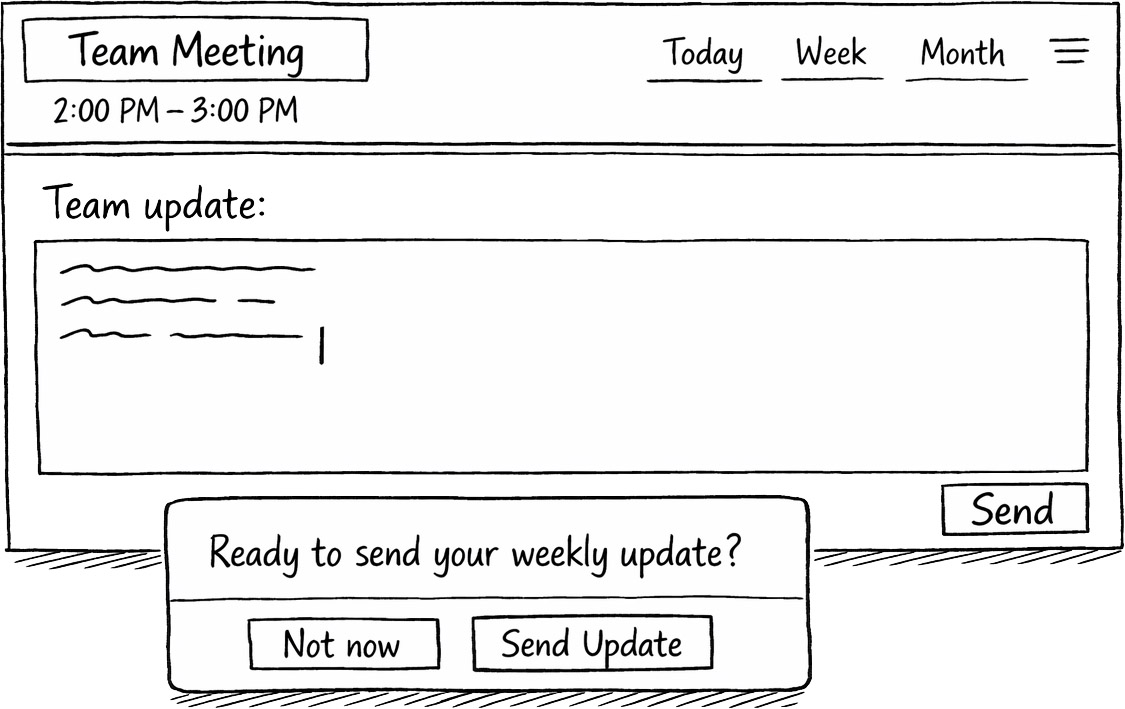
Helping Users Act Again
The most effective time to support the next action is right after the first one has been completed. The user has written and sent their first update. The benefit is clear. The product has proven itself.
At that moment, the experience can extend naturally into what comes next.
When will you do this again?
Providing concrete options makes this easier. After my next meeting. Every Friday afternoon. At the end of my workday.
These options turn a vague intention into something actionable. The user leaves not just with an understanding of the product, but with a clear sense of when it fits into their workflow.
Reinforcing the Right Moment
A decision made once becomes more powerful when it shows up again at the right time. If the user chose to act after meetings, the product can reappear at that moment. A reminder or prompt can bring the action back into focus.
These interactions should feel aligned with the user’s day. They should feel like a continuation of what the user already decided, not an interruption.
This is where onboarding extends beyond the first session. It becomes part of the ongoing experience. A system that supports follow-through, not just initial success.
Keeping the Path Short
The earlier simplification of the workflow becomes essential here. A plan only works if the action it triggers is easy to complete.
If the user returns to a complex process, the plan loses its strength. But when the action is reduced to writing and sending, it fits naturally into a busy day. It requires little setup and minimal effort.
Over time, this makes repetition more likely. The user spends less time deciding what to do and more time doing it.
Closing the Intention Gap
User onboarding begins by helping users understand what is possible. It continues by guiding them to their first meaningful outcome. It extends by supporting return visits and repeated use.
It becomes complete when it removes the distance between intention and action. A shorter path makes the first step easier to take. The right timing makes the next step easier to repeat.
Because in the end, success is not defined by what users intend to do, but defined by what they actually do when the moment arrives.
- Gollwitzer, P. M. (1999). Implementation intentions: Strong effects of simple plans. American Psychologist, 54(7), 493–503.
- Gollwitzer, P. M., & Sheeran, P. (2006). Implementation intentions and goal achievement: A meta-analysis of effects and processes. Advances in Experimental Social Psychology, 38, 69–119.
- Fogg, B. J. (2009). A behavior model for persuasive design. Proceedings of the 4th International Conference on Persuasive Technology.
- Higgins, K. (2018). Better onboarding. Rosenfeld Media.
- 4 User States for Onboarding Planning by Krys Higgins at Krys Higgins
- Optimal Onboarding Zone by Krys Higgins at Krys Higgins
- Choreography Companion: Setup by Krys Higgins at Krys Higgins
- Onboarding UX Checklist by Samuel Hulick
- How to Improve User Retention With a Killer Onboarding Plan by Andrew Capland at Churn FM
- GoDaddy’s Magic Metric for Crushing Churn by Casey Armstrong at Churn FM
- The Hook Model Workshop Exercise by Anders Toxboe at Learning Loop