The End of Static Onboarding
How GenAI can help onboarding systems respond to user context in real time.
Design for behavior change with the Persuasive Patterns card decks
Apply psychological principles to influence decisions, increase engagement, and optimize user experience.
Get your deck!Most onboarding systems are still static.
A user enters a flow, moves through a sequence of predefined steps, and either completes the process or drops off. If enough users drop off, the team changes the sequence. They remove a field, rewrite a tooltip, add a reminder, or simplify a page.
Sometimes that helps.
But it does not change the underlying assumption: that the product can define the path in advance, and the user’s job is to follow it.
That assumption is increasingly fragile.
Users do not move through products in fixed conditions. Their situation changes while they are inside the experience. They may start with motivation but lose confidence. They may understand the task but run out of time. They may be ready to continue until a single step introduces uncertainty, risk, or hesitation.
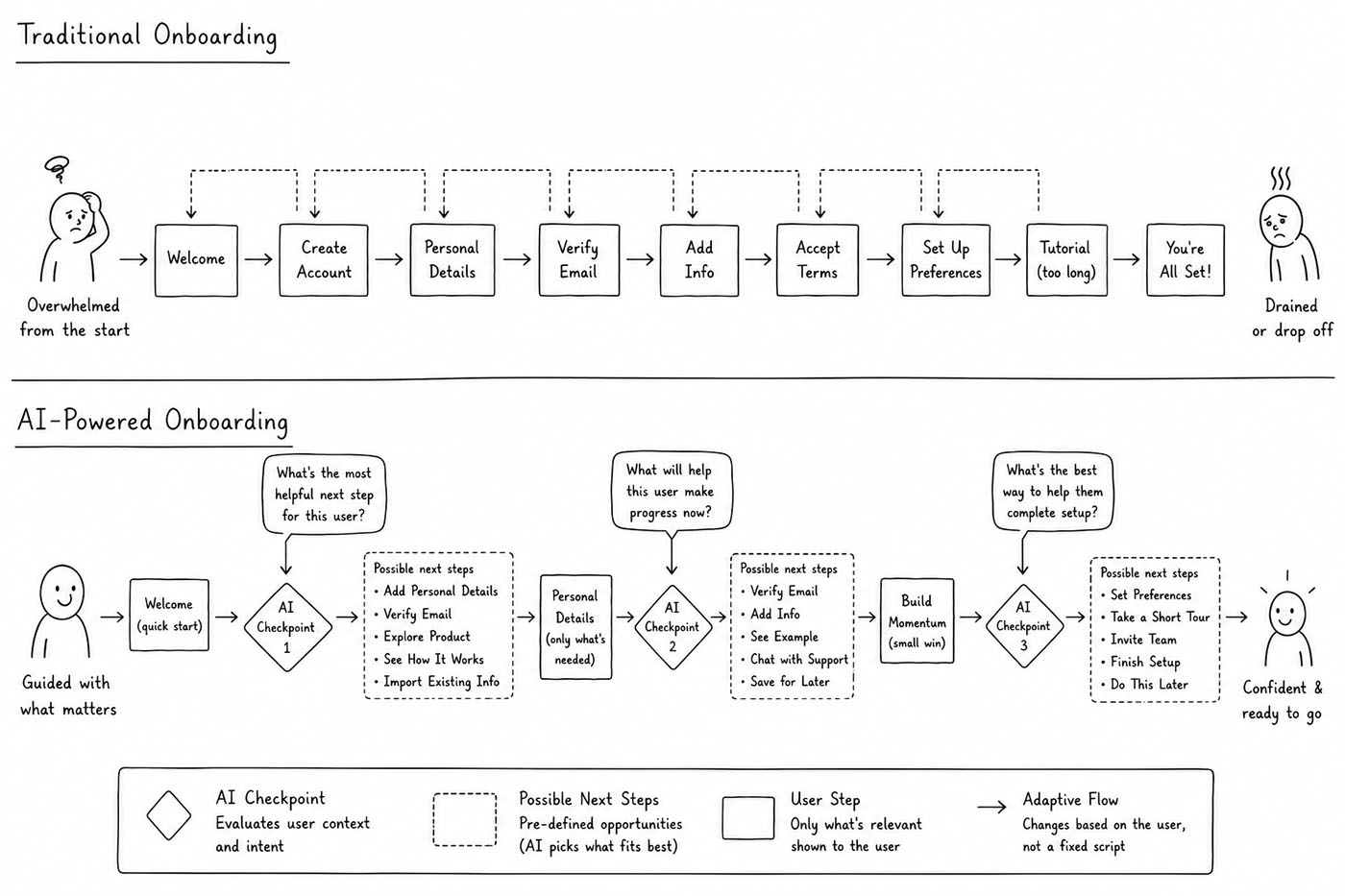
Static onboarding cannot respond to that. It can only continue along the path that was designed in advance and wait to see whether the user completes it.
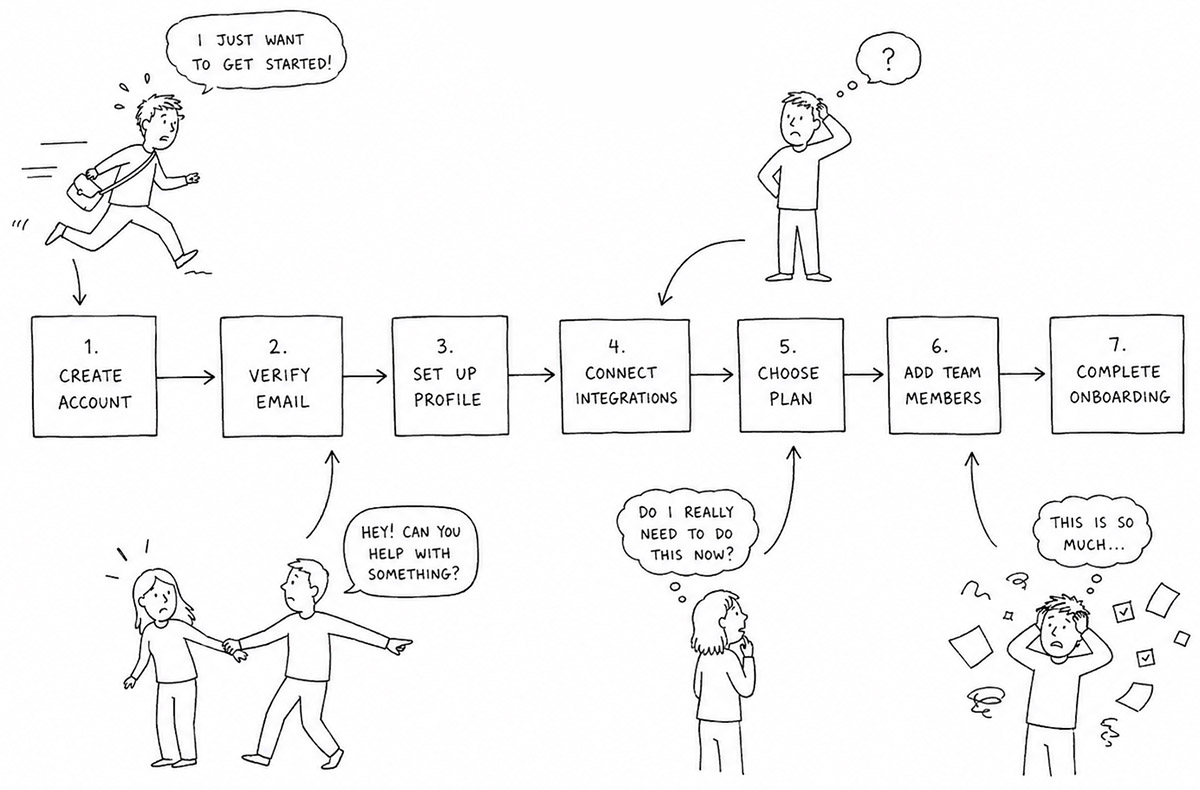
That is why onboarding often breaks down in places that look perfectly reasonable from the product’s side. The step may be clear. The page may be simple. The call to action may be visible. But the action no longer fits the user’s situation.
The flow might be perfectly fine, but the fit between the flow and the moment (context) more often is not.
Why context has been hard to design for
In the MCC Model, onboarding succeeds when motivation, capability, and context align in the user’s current moment. Motivation explains why the user wants to act. Capability explains whether they know how to act. Context explains whether action can happen now.
Of the three, context has often been the hardest to design around.
A product team can clarify value. It can simplify a task. It can use Good Defaults, Progressive Disclosure, Inline Hints, Input Feedback, and Wizard patterns to reduce effort and guide the user through complexity. These are useful tools. They make onboarding more understandable and easier to complete.
But they still tend to assume that the designer knows, in advance, what the user needs next.
Context is harder because it changes while the user is inside the experience. The product does not know whether the user has five minutes or thirty. It does not know whether they are comparing options, filling out a form between meetings, sitting with documents nearby, or trying to complete a task on a phone while distracted. It does not know whether hesitation means confusion, distrust, interruption, or second thoughts.
So most products make a compromise. They design one flow and hope it works across many different situations.
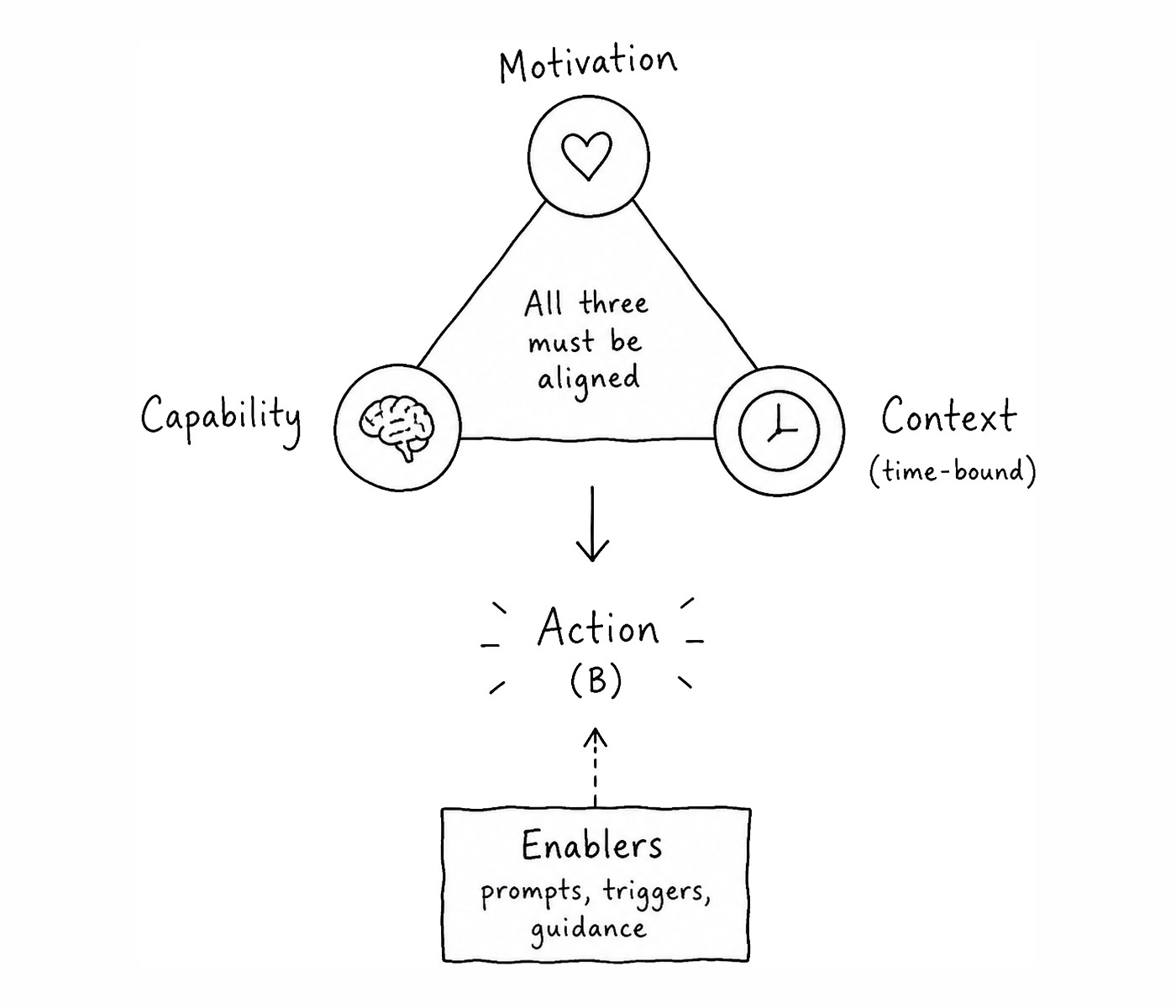
That compromise is the limitation. The same onboarding step may feel easy in one moment and impossible in another. Not because the step itself is badly designed, but because the moment has changed. So it’s not always about asking the user to do something, but rather whether that action fits the situation the user is in.
What GenAI changes
Generative AI (GenAI) makes context easier to work with because it allows the product to interpret more than clicks.
A traditional system can see that a user stopped. It can see that a page was abandoned, a field was not completed, or a cancellation button was clicked. But usually, it sees those things too late. It reacts after the moment has already broken.
A context-aware system can begin responding while the moment is still happening. GenAI feeds on context, and onboarding produces more contextual signals than most static flows are designed to use.
If a user pauses for longer than expected, the system can treat that as a signal. If the user returns to the same explanation several times, that is another signal. If the user edits the same field repeatedly, backtracks, hesitates before linking an account, or writes that they are unsure what to do, the system can begin to infer what might be preventing action.
The user does not move along the perfect path we imagined. That is the important point. They move through the product while their own situation changes. They may be interrupted. They may lose confidence. They may discover that they do not have the information needed to continue. They may become uncomfortable with what the product is asking.
This is a move away from trying to anticipate exactly what the user is thinking and toward identifying likely constraints early enough to help.
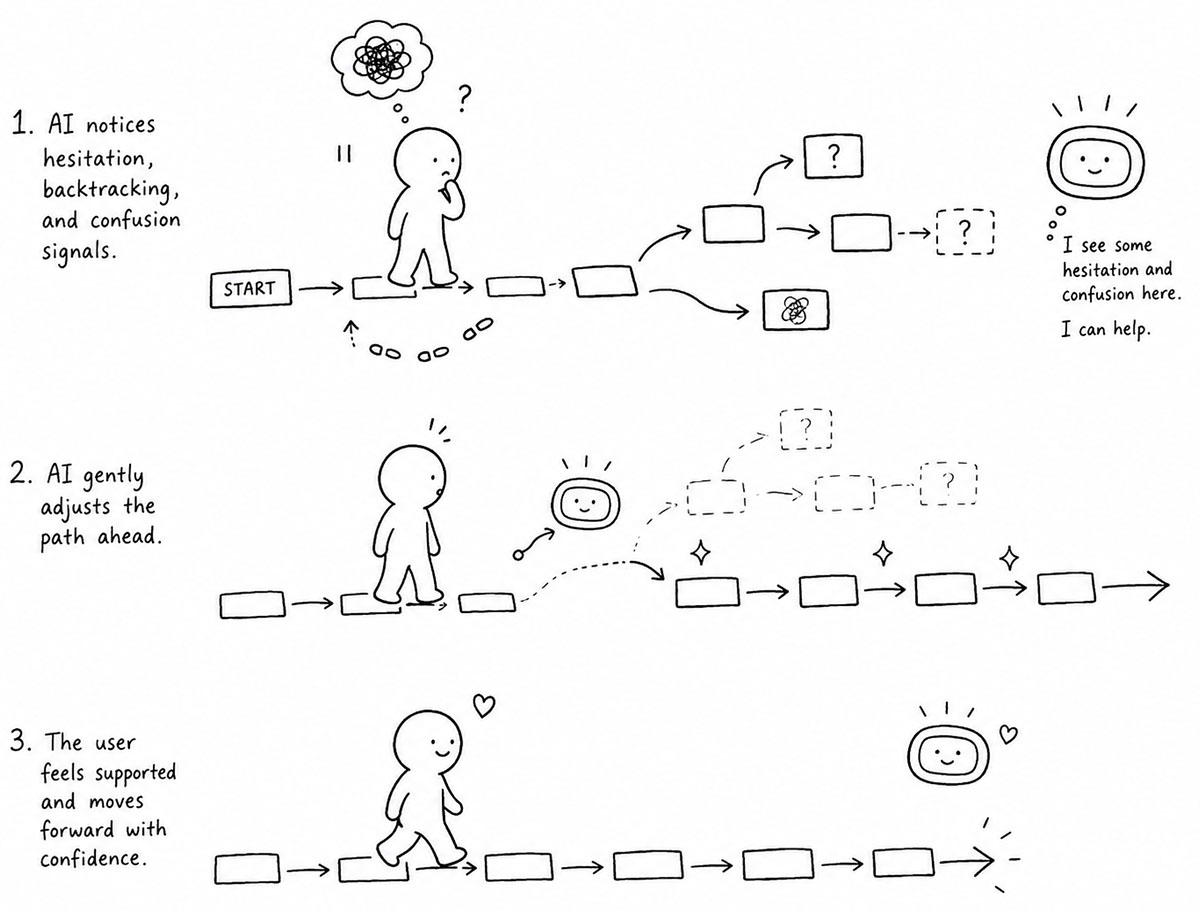
This is the real opportunity with GenAI in onboarding. It is not just that products can add assistants, chat interfaces, or generated help text. The bigger change is that onboarding can shift from predefined flows to adaptive systems.
Instead of only asking what step comes next, the system can ask:
What seems to be preventing action in this moment?
And then change the next step accordingly.
The pattern: signal, constraint, intervention
A context-aware onboarding system does not need to know exactly what the user is thinking. It needs to work with probabilities instead of absolute certainty. It observes a signal, interprets the likely constraint, chooses an intervention, and gives the user a next action that fits the moment.
A pause is not just a pause. It may suggest uncertainty, missing information, low trust, or interruption. Backtracking is not just inefficient behavior. It may suggest that the user does not understand what will happen next. An open-text answer is not just feedback. It can reveal why the current path no longer fits.
The design pattern is simple:
Signal → Likely constraint → Intervention → Next action
This keeps GenAI from becoming a generic assistant. Its role is not to talk more. Its role is to help the product respond better.
The intervention itself does not have to be new. Often, it will be a familiar UI pattern applied at the right time. If the user appears confused, the system might reveal an Inline Hint or an Inline Help Box. If the task appears too large, it might shift into Progressive Disclosure. If the user is making repeated mistakes, it might use Input Feedback. If the user seems interrupted, it might rely on Autosave and send a well-timed Notification later. If the user is afraid of making a mistake, it might offer Undo, Preview, or a more forgiving alternative.
This is where GenAI becomes useful for interface design. Not because it invents better patterns, but because it helps choose which pattern fits the moment.
Example: mortgage onboarding
A mortgage application is a good example because the user’s context matters so much.
The flow may look simple from the product’s side. Verify income. Upload documents. Link accounts. Review details. Submit application.
But from the user’s side, each step can contain very different forms of friction. Income verification might be easy for someone with a regular salary and documents nearby. It might be difficult for someone who is self-employed, missing paperwork, switching jobs, worried about privacy, or unsure which number to enter.
A static flow treats these users almost the same. It asks for the next required piece of information and waits.
A context-aware flow behaves differently. If the user hesitates on income verification for longer than expected, the system does not need to assume they are lost. But it can recognize that something about this moment has become fragile.
The right response depends on the likely constraint.
If the user does not have the right documents nearby, the best intervention may not be more explanation. It may be Autosave, a clear resume option, and a Notification later. If the user is unsure what number to enter, the right intervention may be Inline Help or Input Feedback. If the user is uncomfortable linking an account, the right intervention may be reassurance, a manual alternative, or a clear explanation of how the data will be used. If the user feels overwhelmed, the flow may need to shift into a simpler Wizard or use Progressive Disclosure to separate the immediate step from the details that can wait.
The user could import tax information from a provider they already use. They could continue manually. They could save progress and return when they have the right documents. They could book a video session. They could schedule an appointment at a branch. They could see a short explanation of why the information is needed and how it will be used.
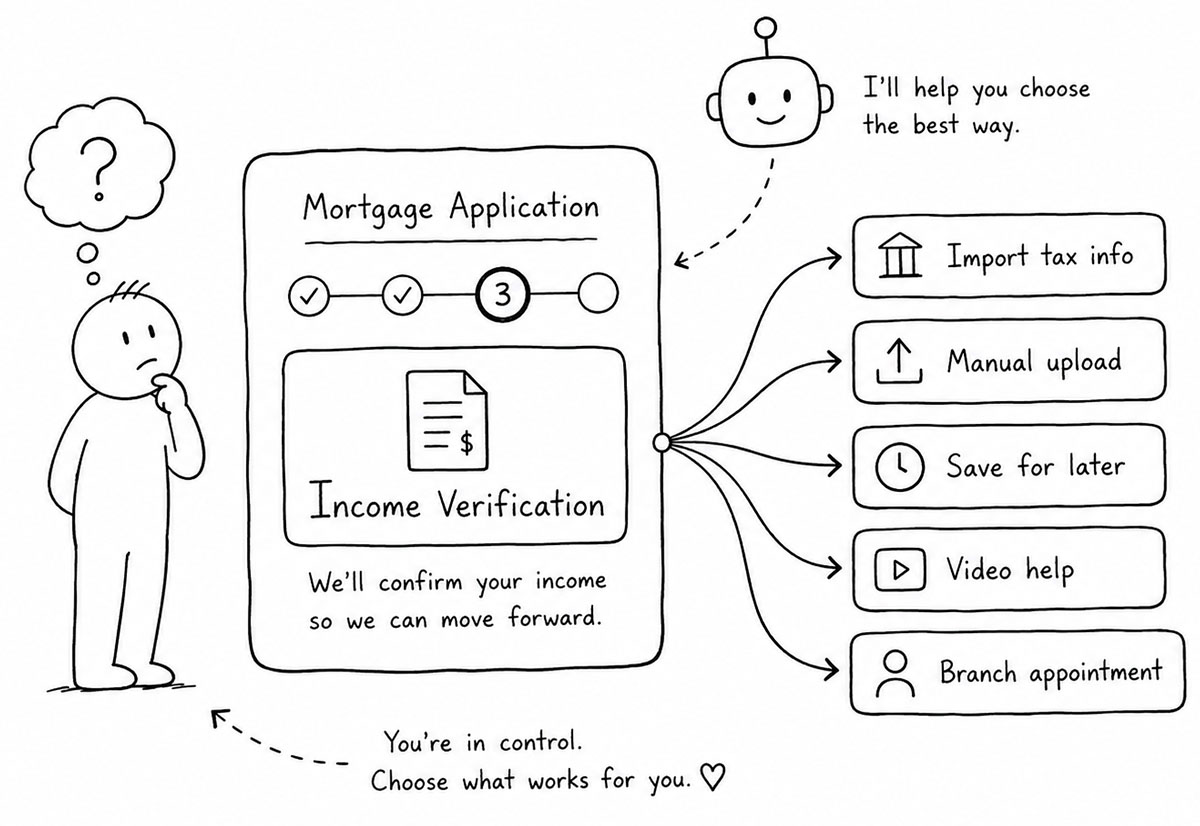
So, don’t show more options. Show the right options for the situation. The same onboarding step can therefore behave differently depending on the user’s context. Instead of forcing every applicant through the same process, the system begins adapting to what the current moment appears to allow.
The same logic applies to retention
The same idea applies after onboarding.
Most cancellation flows are static. The user clicks cancel, answers a survey, and receives a generic retention offer. Sometimes the offer is a discount. Sometimes it is a pause option. Sometimes it is a message from support.
But the reason someone is leaving matters.
A customer leaving because the product is too expensive is not in the same situation as a customer leaving because they never built a habit. A customer leaving because of poor support does not need the same response as a customer leaving because their company changed direction. A customer leaving because of technical issues does not need a coupon before anyone has acknowledged that the product failed them.
Static cancellation flows treat cancellation as one behavior where a more context-aware flow would treat cancellation as many different situations that happen to produce the same observable action.
A better cancellation flow might begin with an open question:
What is making you consider leaving?
From there, GenAI can classify the response and adapt the next step. If the user mentions pricing, the system may offer a different plan or a temporary discount. If they mention low usage, it may offer to pause the account. If they mention poor support, it may offer a call with someone who can help. If they mention technical problems, it may route them to troubleshooting or a human escalation.
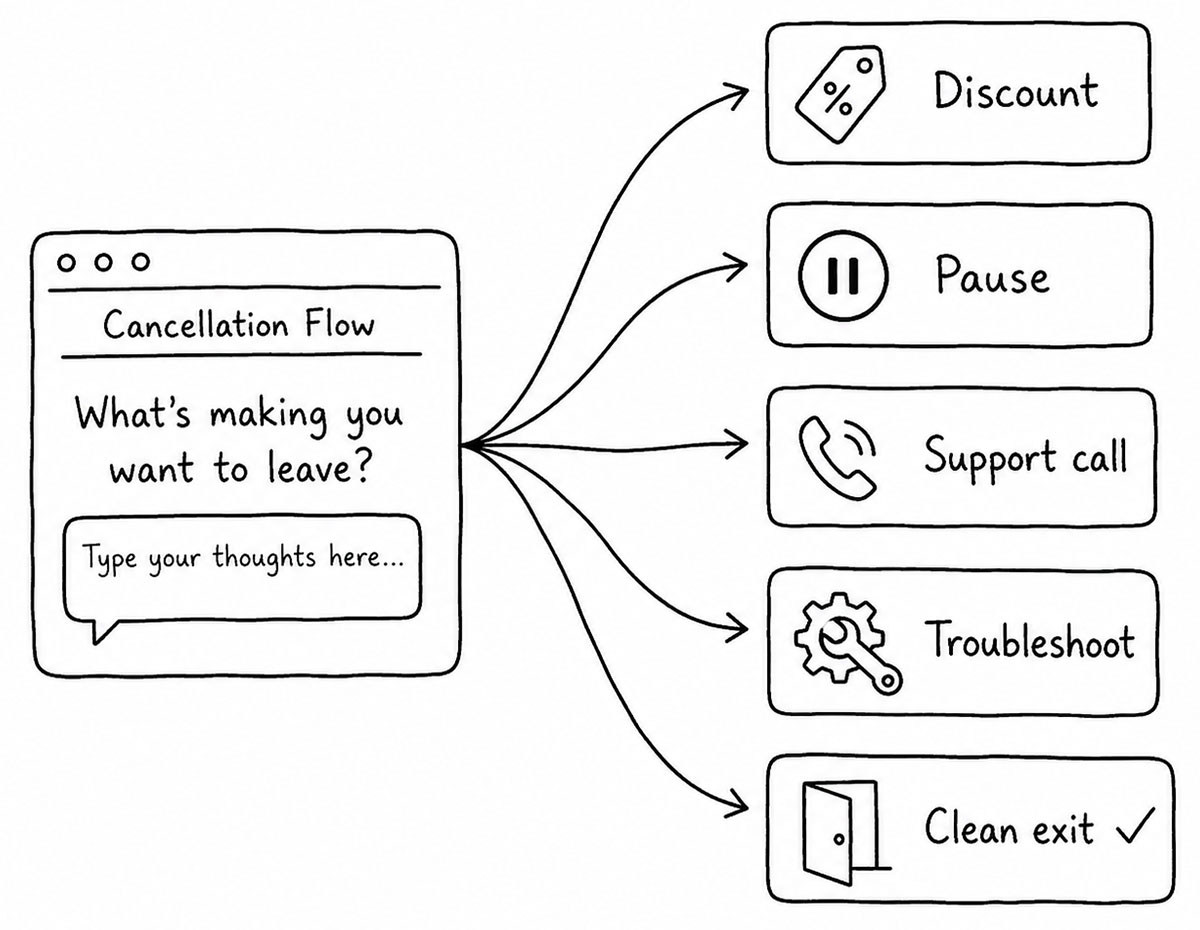
The offer itself can also change. Not only the type of offer, but the copy, the framing, the duration, and the next action.
Here again, the relevant interface pattern depends on the constraint. A user with low usage may need a pause option and a better return path. A user with technical issues may need a support handoff. A user with price concerns may need a downgrade path, not a generic discount. A user who is truly done may need a clean exit.
That does not mean every cancellation should be fought. Sometimes the right outcome is to let the user leave without resistance. But when the product does intervene, the intervention should fit the reason. Otherwise retention becomes noise. Or worse, it becomes pressure.
Dynamic nudges are not generic prompts
This is where the language matters. It is tempting to call these AI nudges. That is not wrong, but it can make the idea sound smaller than it is. A nudge is often treated as a message that pushes the user forward. A tooltip. A reminder. A prompt. A small intervention placed in front of the user at the right time.
But in context-aware onboarding, the point is not simply to push but to have fit.
A dynamic nudge should respond to the constraint that appears to be limiting action. If motivation is weak, the nudge may clarify value or reduce perceived risk. If capability is weak, it may explain the next step, show an example, or offer guided help. If context is weak, it may reduce the task, defer part of it, save progress, or create a return moment.
This is why the same message should not appear to every user. A user who is confused does not need urgency. A user who lacks time does not need a longer explanation. A user who lacks trust does not need a brighter button. A user who lacks confidence does not need another reminder.
The role of GenAI is to make these distinctions possible in real time.
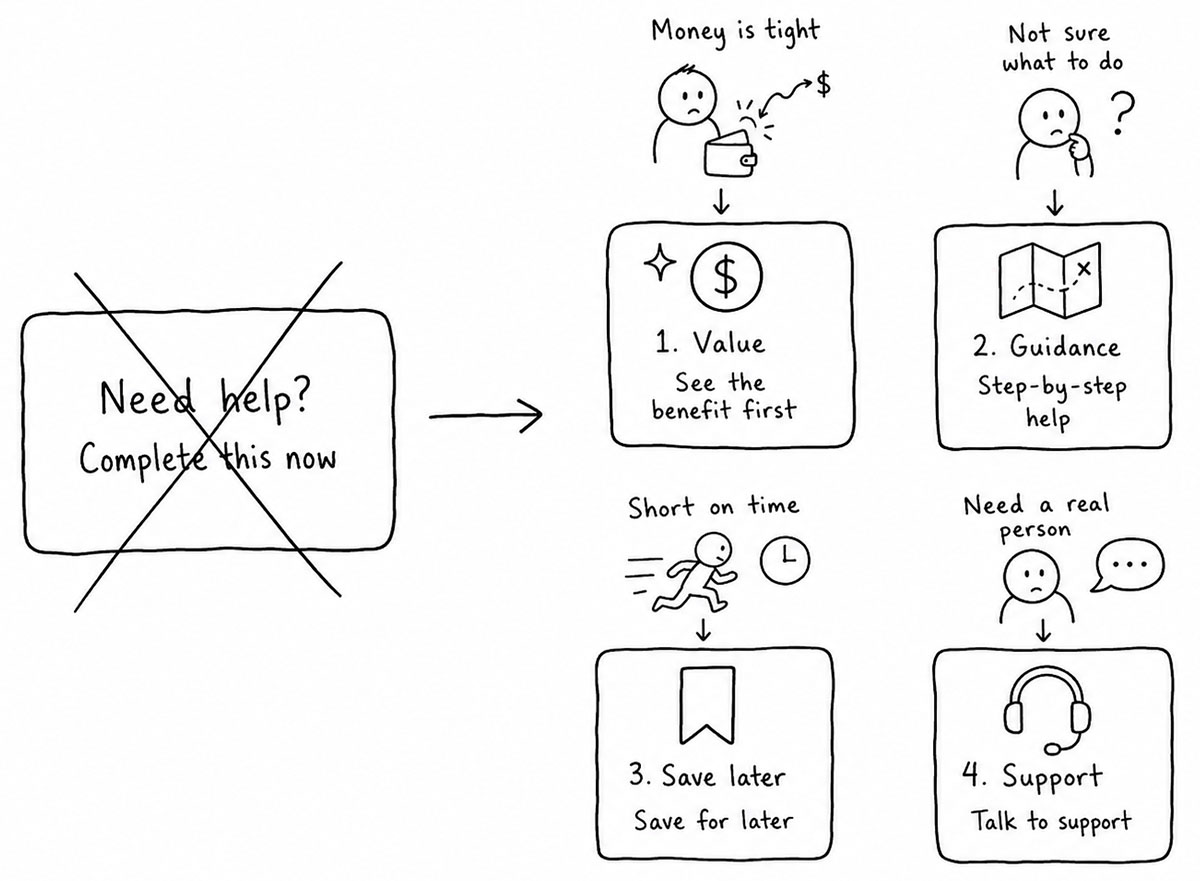
It can help the product choose whether the right response is an Inline Hint, Input Feedback, a Notification, a Wizard step, a Rule Builder, Undo, Preview, Autosave, or no intervention at all. In some moments, the best nudge is not a message. It is a smaller task. In other moments, it is a clearer default. In others, it is a path to human help.
So not more communication, but a better next action.
AI should not replace good onboarding
This is where many teams will get the idea wrong.
Adding AI to a poor onboarding flow does not make it good. A confusing task remains confusing. A bloated process remains bloated. A weak value proposition remains weak. A product that asks too much too early still asks too much too early.
AI can help adapt the experience, but it cannot remove the need for clear onboarding design.
The foundation still matters. The product still needs to make value clear. The task still needs to be understandable. The next action still needs to be visible. The workflow still needs to reduce effort where possible. The user still needs to feel that progress is being made.
A good Wizard still needs well-structured steps. Progressive Disclosure still needs the right information hierarchy. Input Feedback still needs useful validation rules. Notifications still need timing and relevance. Autosave still needs to make users feel safe rather than uncertain about where their work went.
Without that foundation, AI becomes a layer of explanation on top of a bad experience. It may help a little, but it is not the real opportunity.
The real opportunity is to make good onboarding more responsive. To take a clear path and allow it to adjust when the user’s situation changes. To recognize that a user is hesitating, not as a failure, but as a signal. To respond before the moment is lost.
The line between help and manipulation
Context-aware onboarding also creates a responsibility.
If a system can detect hesitation, uncertainty, or discomfort, it can use that information in two very different ways.
It can help the user complete something they already intend to do. Or it can pressure the user into doing something that mainly benefits the business.
It’s a fine line - and it matters.
A mortgage application that offers a manual alternative because the user is uncomfortable linking accounts is helping. A cancellation flow that routes a user with technical problems to a real support option is helping. A product that saves progress because the user appears interrupted is helping.
But a system that detects uncertainty and uses it to increase pressure is not helping. A system that makes cancellation harder because it has inferred weakness is not helping. A system that hides alternatives because it wants the user to choose the most profitable path is not helping.
The purpose of context-aware onboarding should be to reduce mismatch between the user’s situation and the product’s request. Not to exploit the moment.
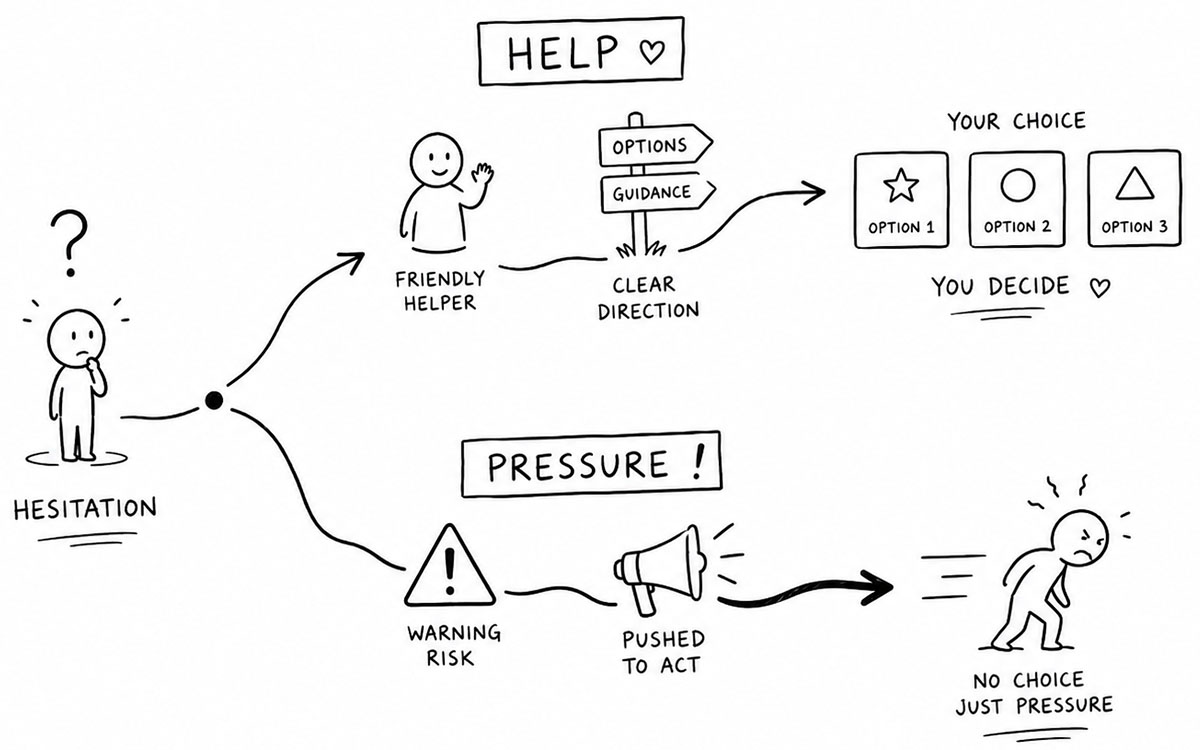
This is why adaptive systems should be designed with limits. Some interventions should require confidence before they appear. Some should provide alternatives rather than narrowing them. Some should make the user’s options clearer, not less clear. And some moments should not trigger intervention at all.
The best context-aware onboarding makes the next useful action easier to do and more available. It doesn’t remove control or tunnel users through a predefined path.
Onboarding that responds to the moment
The future of onboarding is not more checklists, more progress meters, more tutorials, or more rigid flows. It is systems that can respond to the user’s current moment.
The MCC Model argues that behavior depends on motivation, capability, and context aligning at the same time. GenAI makes that idea more practical because the product can begin to interpret context while the user is still inside the experience.
This does not mean every product needs an AI assistant.
It means onboarding can become more adaptive.
When the user hesitates, the product can ask why. When the user lacks time, it can reduce the action. When the user lacks confidence, it can guide. When the user lacks trust, it can reassure or provide alternatives. When the user’s window closes, it can preserve progress and create a return path.
The familiar patterns still matter. Wizard flows, Progressive Disclosure, Inline Hints, Input Feedback, Notifications, Autosave, Undo, and Good Defaults are still part of the designer’s toolbox. But in an adaptive system, they no longer need to be applied in the same way to every user.
They can appear when the moment calls for them. That is the shift from static onboarding to adaptive onboarding.
The product no longer assumes that the same path fits every user, but begins asking whether the next action fits this user, in this moment.
Because onboarding does not fail in general.
It fails when the next action does not fit the user’s motivation, capability, and context right now.
- Toxboe, A. (2026). A Behavioral Model of User Onboarding. Learning Loop.
- Design Patterns by UI-Patterns
- Amershi, S., Weld, D., Vorvoreanu, M., Fourney, A., Nushi, B., Collisson, P., Suh, J., Iqbal, S., Bennett, P. N., Inkpen, K., Teevan, J., Kikin-Gil, R., & Horvitz, E. (2019). Guidelines for human-AI interaction. Proceedings of the 2019 CHI Conference on Human Factors in Computing Systems.
- Guidelines for Human-AI Interaction by Microsoft
- Progressive Disclosure by Nielsen, J.
- 10 Usability Heuristics for User Interface Design by Nielsen, J.
- Card, S. K., Moran, T. P., & Newell, A. (1983). The Psychology of Human-Computer Interaction. Lawrence Erlbaum Associates.
- Sweller, J. (1988). Cognitive load during problem solving: Effects on learning. Cognitive Science, 12(2), 257–285.
- Mark, G., Gudith, D., & Klocke, U. (2008). The cost of interrupted work: More speed and stress. Proceedings of the SIGCHI Conference on Human Factors in Computing Systems.
- Norman, D. A. (2013). The Design of Everyday Things: Revised and Expanded Edition. Basic Books.
- Eyal, N. (2014). Hooked: How to Build Habit-Forming Products. Portfolio.
- Going all in on Cancel Flows by Niko Noll