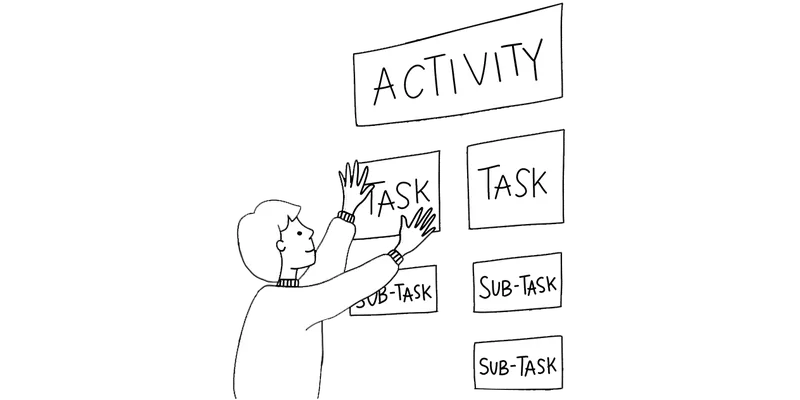
How: Map the user's activities, add story details underneath and choose a release that supports a complete goal.
Why: Keep the user goal visible while choosing what to build, defer or investigate
When: Use when a team needs to turn customer understanding into a coherent product release rather than a disconnected feature list
User story mapping arranges a user’s activities and smaller stories into a shared view of an experience, helping a team choose useful release scope. It connects individual backlog items to the goal they support.
How to read a user story map
Jeff Patton popularized story mapping. His quick reference explains the backbone, narrative flow and release slices.
- Backbone: high-level activities and tasks that give the experience its structure.
- Tasks or steps: actions the user takes within an activity.
- Stories and details: smaller capabilities, alternatives and exceptions placed below their related tasks.
- Release slice: selected work supporting a particular user goal, separated from deferred options by a horizontal boundary.
Read across to explain the experience and down to discuss detail and priority. The map supports conversation; it is not a precise workflow notation or proof that every person follows one sequence.
A worked release-slicing example
This online-workshop scenario is hypothetical. The user’s goal is to find a suitable session, reserve a place and attend it. The proposed first release offers a date list, booking confirmation by email and a working join link. Topic filters, calendar invitations and reminders are later options.
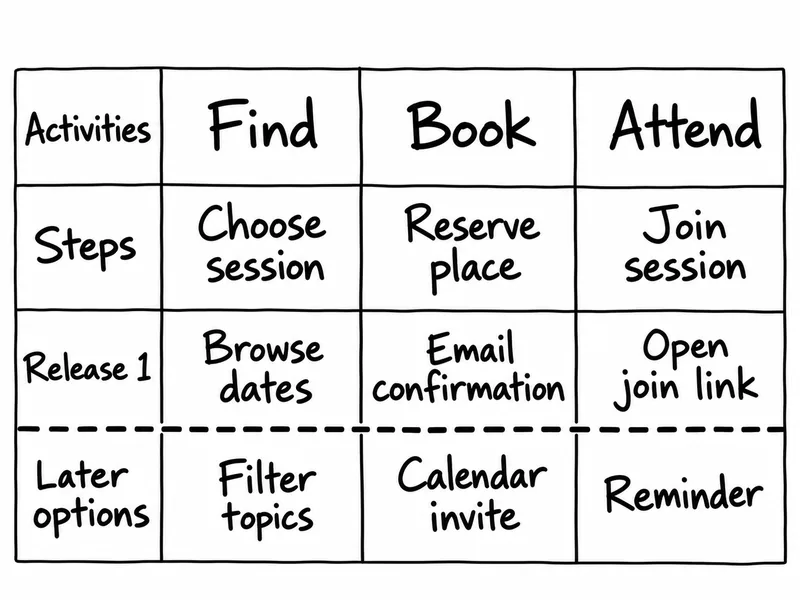
The top two rows form the backbone in this simplified example. The first release spans the goal rather than delivering a sophisticated search screen with no way to reserve or join. The drawing is condensed: before release, add details such as capturing a reservation, respecting capacity, explaining session times and recovering from missing email. Security, accessibility and operational requirements still need review.
From a flat backlog to a story map
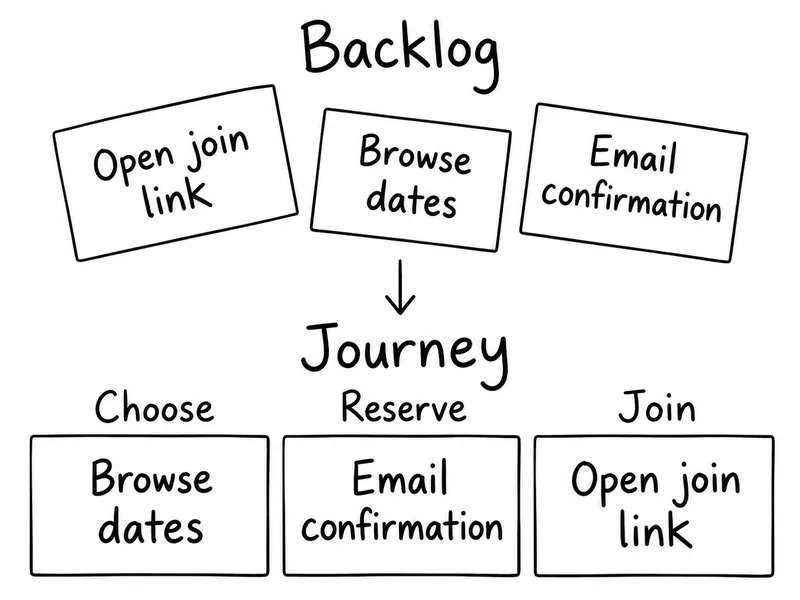
The second drawing reorganizes the same first-release items. A flat backlog can rank work, but the map makes their relationship to the user task easier to discuss. Keep links between map cards and tracked backlog items so planning does not create two conflicting records.
Suppose the team cannot yet show that people understand how to join. Assign a check with representative users before expanding calendar features. A successful walkthrough of the map alone does not establish that the interface works or that people will book.
Story map vs journey map vs outcome roadmap
A customer journey map describes the person’s experience, including context and difficulties. A story map explores what the product should enable and how to divide that work into useful increments. An outcome roadmap communicates the changes you aim to achieve and why; a release slice is one proposed way to support them.
Use Service Blueprint when the question concerns the visible and hidden work delivering the service. Use Customer Interview when you need evidence about the tasks themselves. Keep assumptions visible and revisit the map as research, delivery and feedback change your understanding.
Instructions for running this play
- Frame one goal. Spend 10 minutes choosing a user, situation and useful outcome. State whether you are mapping today’s experience or a proposed one, and review the research supporting that scope.
- Tell the whole task. Use 10 minutes of Silent Storming to write user actions on separate notes. Arrange them left to right in the order that explains the experience; retain important alternative paths.
- Build the backbone. Spend 15 minutes grouping related tasks under higher-level activities. Use short verb phrases and a consistent level of detail; an existing Journey Mapping output can inform the sequence.
- Add story options. Use 15 minutes to place smaller tasks, variations and recovery needs underneath the relevant steps. Keep source references and mark assumptions; discuss product, design, engineering and testing implications together.
- Slice a useful release. Spend 20 minutes naming a release goal and moving the necessary details above a release boundary. Keep optional improvements below it; check that the selected work supports the whole goal and includes necessary dependencies.
- Walk the slice. Use 10 minutes of Playback to tell the story using only the selected scope. Check where the user could get stuck, what evidence is missing and which risks require investigation before commitment.
- Agree the next work. Spend 10 minutes choosing a learning check and the first stories to refine with acceptance criteria. Assign an owner and review date using a Who / What / When Matrix; distinguish release scope from development order.
Tips to perfect this play
Master and adapt the play to fit your context and needs.
Tip: Keep the backbone
Retain the high-level activities as context when splitting detailed stories. Do not replace the user's narrative with a ranking of isolated features.
Tip: Separate release and build
A release slice describes a useful outcome. Its stories may be built in a different order because of dependencies, technical risk or testing needs.
Tip: Inspect missing paths
Review relevant failures, accessibility needs and recovery paths before calling a slice releasable. A tidy map is not a release-readiness checklist.
Tip: Revise after learning
Keep source references and uncertainty labels on a shared board. Update later options after research and release feedback rather than treating them as commitments.
Trigger Questions
- Must every release include a story from every column? No. Include the tasks needed for the selected user's goal; some activities or alternative paths may be outside that release's scope.
- Is a walking skeleton ready to launch? Not necessarily. A thin end-to-end implementation can expose technical risks while still lacking the reliability, usability or safeguards needed for release.
- Does a story map prove that people want the product? No. It organizes a proposed experience; research and experiments must test demand, usability and important assumptions.
Explore Discovery Patterns for methods that help you investigate the customer activities and needs behind your map.
$129 · Printed deck + digital edition
Explore Discovery Patterns- The New User Story Backlog is a Map by Jeff Patton
- Story Map Concepts and Story Map Process by Jeff Patton
- Mapping User Stories in Agile by Anna Kaley