Pareto Analysis
A way of ranking recorded problems by category to see which few categories account for most occurrences
Pareto Analysis at a glance
- Type
- Method
- Also called
- Pareto Chart and Pareto Diagram
- Metrics
-
3 relevant metrics to track
- Count of records per category in a fixed period
- Cumulative percentage of records
- Share of records classified as Other or left unclassified
Pareto analysis ranks recorded problems by category, from most to least frequent, to show which few categories account for most of the occurrences. It is usually drawn as a Pareto chart: bars sorted from tallest to shortest with a line showing the cumulative percentage.
Teams often face a long list of complaints, errors or defects and no obvious place to start. A Pareto chart answers one question about that list: where are the records concentrated? It does not answer why those problems happen, or which ones matter most.
How Pareto analysis works
The name comes from the economist Vilfredo Pareto, whose studies of land ownership in Italy showed a very uneven distribution. According to the Juran Institute, the quality pioneer Joseph Juran applied the same idea to quality problems, described it as separating “the vital few” from the rest, and named it after Pareto.
The underlying observation, often called the Pareto principle or 80/20 rule, is that effects are frequently distributed unevenly across categories. The numbers 80 and 20 are a rule of thumb, not a property every data set must have.
A Pareto chart has three parts:
- Categories on the horizontal axis, sorted from most to least frequent. A catch-all “Other” category usually goes last, whatever its size.
- Bars showing the count (or another measure) for each category in a fixed period.
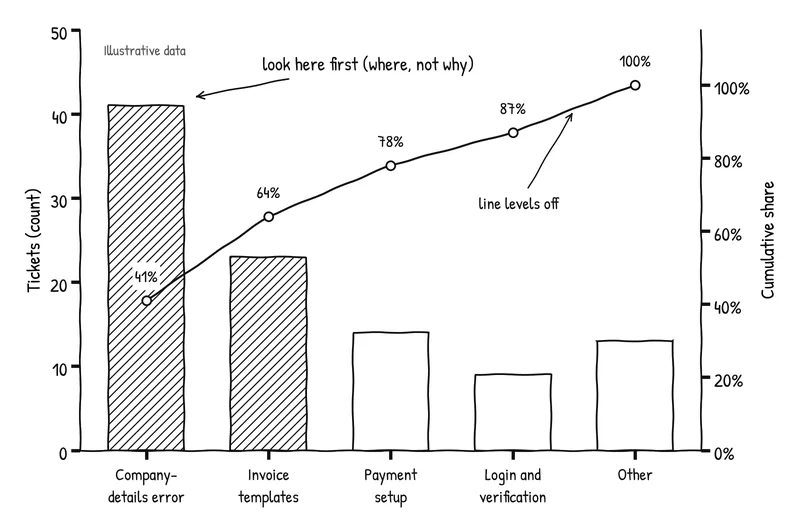
- A cumulative line showing the running percentage of the total. Where the line rises steeply, a few categories account for much of the total. Where it levels off, the remaining categories each add little.
ASQ lists the Pareto chart among the seven basic quality tools and notes that the bars can be ordered by frequency or by cost. In its overview of cause-analysis tools, ASQ groups it with tools that examine data rather than with tools that organize possible causes.
A worked example
The following tickets, counts and categories are illustrative. They are not results from an actual customer study or incident.
The subscription service from the root cause analysis guide has a support queue full of setup questions. Over four weeks, 100 tickets mention setup. The first chart uses the tags support agents already applied:
| Category (existing tags) | Tickets | Cumulative % |
|---|---|---|
| Invoice template questions | 23 | 23% |
| Form error | 22 | 45% |
| Can’t continue | 19 | 64% |
| Payment method setup | 14 | 78% |
| Login and verification | 9 | 87% |
| Other | 13 | 100% |
Read at face value, invoice templates are the biggest setup problem. But when the team reads a sample of tickets together, it finds that most “Form error” and “Can’t continue” tickets describe the same thing: an error after pressing Continue on the company-details step. Agents chose different tags for the same problem.
Using Affinity Mapping, the team agrees on category definitions with examples and re-codes the tickets:
| Category (agreed definitions) | Tickets | Cumulative % |
|---|---|---|
| Error on company-details step | 41 | 41% |
| Invoice template questions | 23 | 64% |
| Payment method setup | 14 | 78% |
| Login and verification | 9 | 87% |
| Other | 13 | 100% |
The data did not change; the categories did, and so did the leading bar. The company-details error is now the place to look first.
Three further checks keep the team from over-reading the chart:
- Frequency is not cost. Payment-method tickets are fewer, but each one blocks a customer from invoicing and takes longer to resolve. Charting the same categories by time to resolve or blocked accounts could change the order.
- The queue is not the population. Customers who abandon setup without contacting support are missing. Error analysis of product logs can show failures that never became tickets.
- The bar is not the cause. Forty-one tickets about one error show where to investigate. The root cause analysis guide shows how the team then establishes the mechanism behind that error.
How to use Pareto analysis
- Define the record, population and period. Decide what counts as one occurrence: a ticket, a logged error, a failed session. Fix the period so categories are compared over the same time.
- Choose a data source that records the problem. Customer service logs capture what customers report. Error analysis captures failures in the product, including ones nobody reported. Note what each source cannot see.
- Agree on categories before counting. Write a definition and an example for each category and check that they do not overlap. Group exercises such as Affinity Mapping help a team agree on categories from a sample of real records.
- Count, sort and draw the cumulative line. Keep “Other” last. If “Other” is one of the biggest bars, the categories need work.
- Chart an impact measure as well as frequency. If the order changes when you chart time to resolve, revenue at risk or affected customers, discuss both versions.
- Investigate the leading categories. Use root cause analysis to explain why the problems in a category occur, for example with a fishbone diagram and evidence that separates the hypotheses.
- Repeat with the same definitions. After a change, chart the same categories over a comparable period to see whether the distribution moved.
Pareto analysis vs. root cause analysis
Pareto analysis and root cause analysis answer different questions and work well in sequence:
| Pareto analysis | Root cause analysis | |
|---|---|---|
| Question | Which recorded problem categories occur most often? | Why does this problem occur, and what needs to change? |
| Input | Many records sorted into categories | One defined problem and the evidence about it |
| Output | A ranking that shows where to look | A supported causal explanation and corrective actions |
| Cannot show | Why the problems occur | How common the problem is across all records |
A Pareto chart can also be applied within a cause analysis, for example to count which of several possible causes appears most often in a set of investigated incidents. Even then, the count depends on how each cause was classified.
Limitations and common mistakes
The chart depends on the categories. As the example shows, splitting one problem across two labels can move it from first place to the middle. Overlapping, vague or inconsistently applied categories produce a misleading ranking.
The chart depends on what gets recorded. A support queue overrepresents customers who contact support and problems that are easy to describe. Silent failures, workarounds and churn can be missing entirely.
Frequent is not the same as most costly. A rare problem can do more harm than a common one. Rank by an impact measure as well, and say which one you used.
Frequency says where to look, not what causes the problem. A tall bar is a prompt for investigation. Treating it as an explanation skips the step where you find and test the mechanism.
80/20 is not a target. Do not adjust categories until the chart shows the expected split, and do not assume a flat distribution means the analysis failed. It may mean there is no dominant problem category.
Counts need a fixed period and a stable source. A change in tagging rules, support staffing or logging can look like a change in the problem.
Visual examples

Illustrative setup tickets charted twice: split across two overlapping categories, the company-details errors look like two medium problems; merged into one agreed category, they lead the chart.
-
What exactly are we counting?
Hint Define the record (a ticket, an error event, a failed session), the population and the period before sorting anything. Different records produce different charts. -
Who decided the categories, and do they overlap?
Hint Agree on category definitions and examples before counting, and check that one problem cannot be filed under two labels. -
What is missing from the data?
Hint Ask which problems never become a ticket or log entry. Customers who give up silently do not appear in a support queue. -
Is the most frequent category also the most costly?
Hint Not necessarily. Chart the same categories by an impact measure, such as time to resolve, blocked revenue or affected customers, and compare the order. -
Does the tallest bar tell us the cause?
Hint No. It tells you which category to investigate first. Use root cause analysis to explain why problems in that category occur. -
Does it have to be 80/20?
Hint No. The 80/20 split is a rule of thumb about uneven distributions, not a law. Some data sets are much more concentrated and some are not concentrated at all.
You might also be interested in reading up on:
- What is a Pareto Chart?
- Pareto Chart by Agency for Healthcare Research and Quality
- Dr. Juran's History by Juran Institute
- Cause Analysis Tools
Product Weekly · Curated by Anders Toxboe
Sign up for the Product Weekly newsletter.
Join 40,000+ product people who get a weekly selection of useful reads on building digital products, plus new Learning Loop resources and occasional product updates.
What will I receive?Takes 10 seconds. Free to subscribe, unsubscribe at any time. Privacy policy.