Idea Validation: Product
Paper Prototype
Rapidly sketch and lay out interaction design concepts on paper

How: Sketch a quick and rough drawing of a static user interface or model of a design on a piece of paper. Consider using cut-outs to create a design system of movable components or simulating animations and interactions with folded paper.
Why: A cheap tool that is easy to understand and fast to use for anyone inside and outside a team to demonstrate a product and its proposed user experience before writing code or beginning development. While paper prototyping seems simple, it can provide great, quick, and useful feedback that can validate your product fast.
A paper prototype is a low-cost, usually hand-drawn version of an interface or product flow that people can react to or use in a simulated task. A facilitator can swap paper screens, cards, and labels as the participant makes choices. This helps you find confusing steps before investing in interactive design or code.
Choose paper when it can answer the question you need to investigate. The prototype guide compares fidelity and prototype types so you can decide what needs to be realistic before sketching.
Use paper when it preserves what you need to observe
Paper prototypes can support user testing as well as team discussion. Give a participant a realistic task and have a facilitator swap screens or components in response to their actions. This can reveal confusing labels, missing information and problems with the order of screens.
Choose another form when the question requires behavior paper cannot represent adequately, such as a precise gesture, a live calculation or a system response. Paper is one option, rather than a compulsory first stage before a clickable or working prototype. The GOV.UK prototyping guidance recommends choosing the form that meets the current need.
Interpreting or completing a paper task does not establish market demand, willingness to pay or technical feasibility. Keep those uncertainties separate and choose additional research or experiments when they affect the product decision.
Paper prototype example: requesting an appointment
Illustrative example, not the results of a completed study.
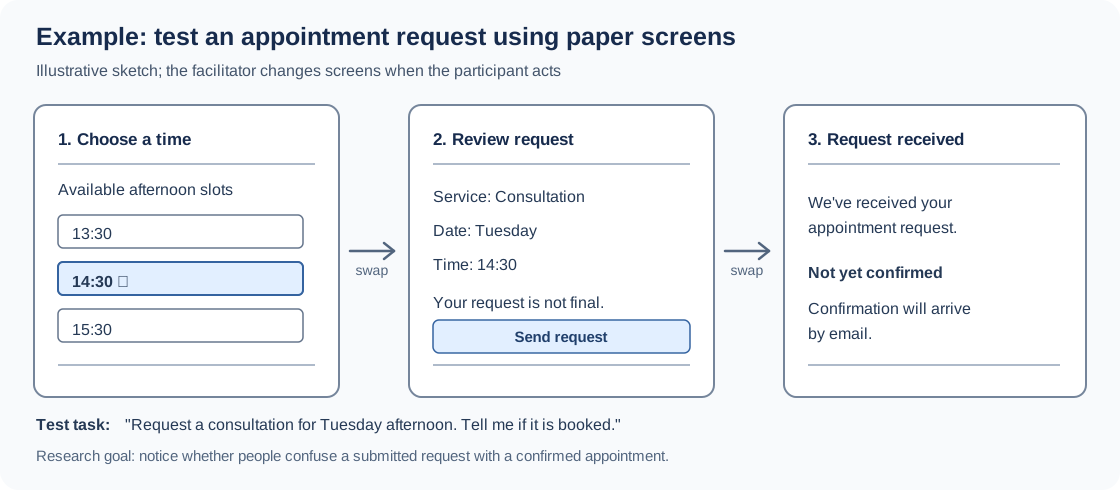
Imagine a team designing a clinic appointment service. It needs to know whether people understand that submitting a request is not the same as having an appointment confirmed. It can explore that misunderstanding using only paper.
| Component | Example |
|---|---|
| Assumption | Participants can submit an appointment request and correctly identify whether the appointment is confirmed |
| Materials | Three paper screens, separate time-slot cards, pens and an observation sheet |
| Test task | “Request a consultation for Tuesday afternoon. Tell me when you know it is booked” |
| Facilitator’s role | Swap the paper screen after a choice, show the matching response, and avoid explaining the meaning of the confirmation |
| What to observe | Where the participant taps, what they expect next, what they call “confirmed,” and whether they notice the provisional status |
| Next decision | Change wording or screen order if people mistake a submitted request for a confirmed booking |
How to make a paper prototype
- Name the question first. Decide what you need to learn about the screen order, information, language, or interaction.
- Sketch only the needed screens. Use one sheet per main state and separate cards or sticky notes for options that can change.
- Prepare realistic content. Use plausible dates, labels, and messages. Avoid placeholder text if comprehension is what you want to test.
- Write down the response rules. Decide which piece of paper the facilitator will show after each likely action, including Back and unexpected choices.
- Rehearse the task. Confirm that the participant can reach the important states without the facilitator having to explain the design.
A paper screen does not have to resemble the final visual design. Its job is to make the intended interaction understandable enough to investigate.
How to run a paper prototype usability test
Give participants a goal without describing the correct sequence: “Request a consultation for Tuesday afternoon. Tell me when you know it is booked.”
Ask them to point or tap where they would act; the facilitator then moves the corresponding card or changes the paper screen. Watch whether they find the available times, understand what sending a request does, and correctly interpret the last message. Ask neutral follow-up questions such as “What do you think happens next?”
Record what the person did and said, separately from the team’s explanation of why it happened. For example:
| Observation (hypothetical) | Possible interpretation | Follow-up to test |
|---|---|---|
| Says “I’m booked” after the final screen | “Request received” may look too much like confirmation | Make provisional status more prominent and repeat the task |
| Taps the date heading expecting to change the date | The prototype lacks an expected control | Add a visible date-selection step |
| Asks whether the time shown is available | The availability state may be unclear | Compare clearer slot labels or availability cues |
These are possible findings, not observed study results.
When should you use something other than paper?
A clickable prototype can be more appropriate when you need to test realistic navigation, gestures, or transitions. A working prototype can test functioning calculations, data, or integrations. A Wizard of Oz experiment can simulate complex system behavior by having a person perform it behind the scenes.
Paper alone cannot demonstrate technical feasibility, production response times, actual availability, willingness to pay, or long-term product demand. Consult the prototype guide to choose a method based on the uncertainty you need to reduce. The Experiment Sheet helps define the question, and the Learning Sheet helps document observations and decisions.
Frequently asked questions about paper prototypes
What is a paper prototype example?
A series of hand-drawn checkout, booking, or onboarding screens that a facilitator changes as someone tries a task. The important part is the user’s interaction, not artistic detail.
How do you test a paper prototype?
Present a realistic task, let a participant point to actions, use paper cards to simulate the system’s responses, and record confusion and mistakes without coaching the participant.
Does paper prototyping require coding?
No. Paper, pens, printed screens, sticky notes, and cut-out controls are often sufficient.
Is a paper prototype the same as a wireframe?
They can overlap. A wireframe generally describes layout and hierarchy; a paper prototype can also simulate a sequence of interactions so someone can attempt a task.
Real life Paper Prototype examples
Twitter, Quicken & Vimeo
Most household tech products started their life on paper. While most paper prototypes never reach the public eye, a few are public. Twitter, Quicken, and Vimeo are among those you can find through a simple search online.
Source: Top 5 Paper Prototype Screens
Paper Prototype is one of the cards in this deck
Get this experiment in the Validation Patterns card deck.Compare experiments and choose what to test next with your team.
$129 · Printed deck + digital edition
Get your deck!Related plays
- Paper Prototyping by Shannon McHarg
- Prototyping - The UX playbook by Hanno
- Paper Prototyping – A list apart by Shawn Medero
- The Real Startup book - Paper Prototyping by Tristan Kromer, et. al.