Choose your behavioral design tool based on the problem you're solving. A model that helps diagnose why a behavior happens does a different job from a card deck that helps generate ideas or an experiment that tests whether an intervention works.
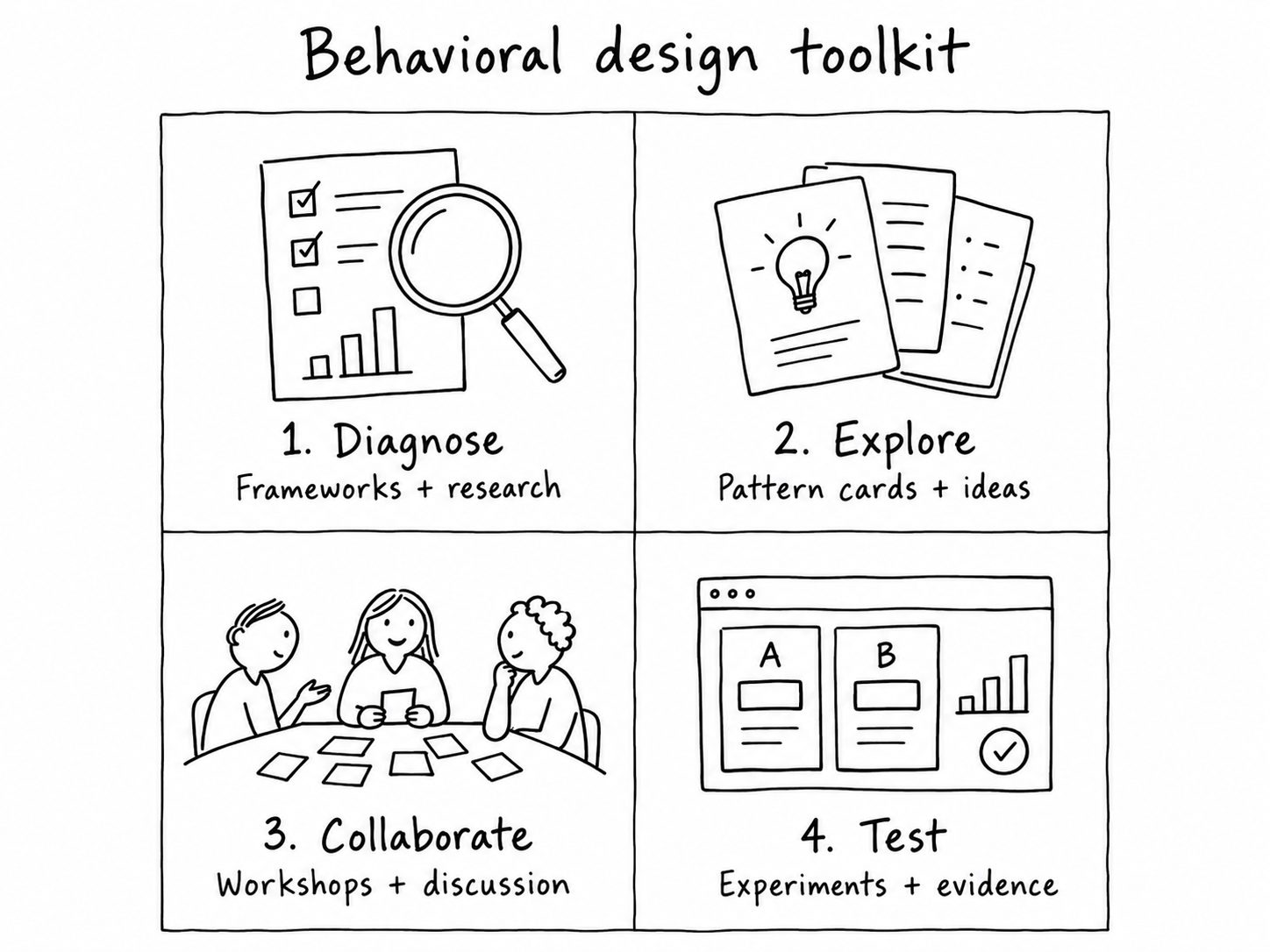
For UX designers, product managers and growth teams, the most useful toolkit is often a combination: a diagnostic framework, a way to explore interventions, a collaborative method and an evaluation approach.
Short answer: Start with COM-B and user research when you do not know why a behavior happens; use a pattern library or cards when you need alternatives; run a workshop when you need team alignment; and use usability testing or experiments to check what works.
Planning internal team training? See the behavioral design workshop materials checklist for a free-first facilitator kit, practical pattern-based exercise and optional deck choices.
Choose a tool by the job you need to do
The following is a practical guide to tool categories, not a ranking of products. Each approach has a different role in the work.
Understand why people act
Try: COM-B, Fogg Behavior Model, user interviews and journey analysis.
Output: a specific behavior and plausible barriers, grounded in evidence.
Generate potential interventions
Try: behavioral pattern libraries, cards and structured ideation.
Output: several ideas, each linked to a behavioral hypothesis.
Discuss options with a team
Try: workshops, canvases, card sorting and facilitated critique.
Output: shared assumptions, prioritized approaches and ownership.
Find out what actually helps
Try: usability testing, prototypes, experiments and product analytics.
Output: evidence about user outcomes and unintended effects.
Not every problem needs every tool. Start with the missing piece in your current process. A team with plenty of ideas but little evidence needs better diagnosis and testing, not another ideation activity.
Quick reference: which tool should you choose?
Use the evidence you already have and the decision you need to make – not a popularity ranking – to select a tool.
| Your question | Start with | What you get |
|---|---|---|
| Why don't users act? | Research + COM-B | Barrier hypotheses |
| What might help? | Pattern library or cards | Intervention ideas |
| How do we align? | Facilitated workshop | Shared decisions |
| Does it work? | Usability tests or experiments | Evidence to act on |
1. Tools for diagnosing user behavior
Start by naming an observable behavior: “A user created an account but did not finish setting up a first project.” Then investigate why. Avoid jumping immediately to a familiar bias.
COM-B: capability, opportunity and motivation
COM-B asks whether people have the capability, opportunity and motivation to perform a behavior. It's especially useful when a team assumes users need to be persuaded, although the real problem might be missing knowledge, inaccessible controls or limited opportunity.
Fogg Behavior Model: motivation, ability and prompt
The Fogg Behavior Model proposes that motivation, ability and a prompt need to converge for a behavior to occur. It can help frame questions about effort, timing and cues. Use it as a working model, not as proof of a particular cause. If you lack direct user evidence, investigate before selecting a design pattern.
Interviews, observation and journey analysis
Models are more useful when paired with evidence. Observe people using the product, ask about their goals and constraints, inspect task completion data and identify points of friction. Treat analytics as a signal about where behavior differs, not an automatic explanation of why.
- Write down one action a user wants to complete.
- List what they need to know, be able to do and have access to.
- Identify possible motivational or contextual barriers.
- Mark each explanation as observed or assumed.
- Choose the most important assumption to investigate next.
2. Tools for generating behavioral design ideas
Once you've diagnosed the likely barrier, use principles and examples to widen the range of possible solutions. Pattern libraries are useful here because they let you review approaches without relying on memory.
Behavioral pattern libraries
A pattern library organizes ideas such as feedback, social proof, simplification, framing and defaults into references you can compare. A useful pattern entry should explain the mechanism, the conditions in which it might apply and any potential ethical concerns.
The Learning Loop Persuasive Patterns playbook is a free library of 80 patterns. Browse it when you need possible approaches, then return to your user research to decide which ideas are plausible.
Behavioral design card decks
Printed cards serve a slightly different purpose from a searchable library: they can sit on a table, be grouped and compared, and prompt multiple people to contribute ideas. They are useful in ideation sessions, design reviews and product workshops. Digital versions can be easier to use individually or remotely.
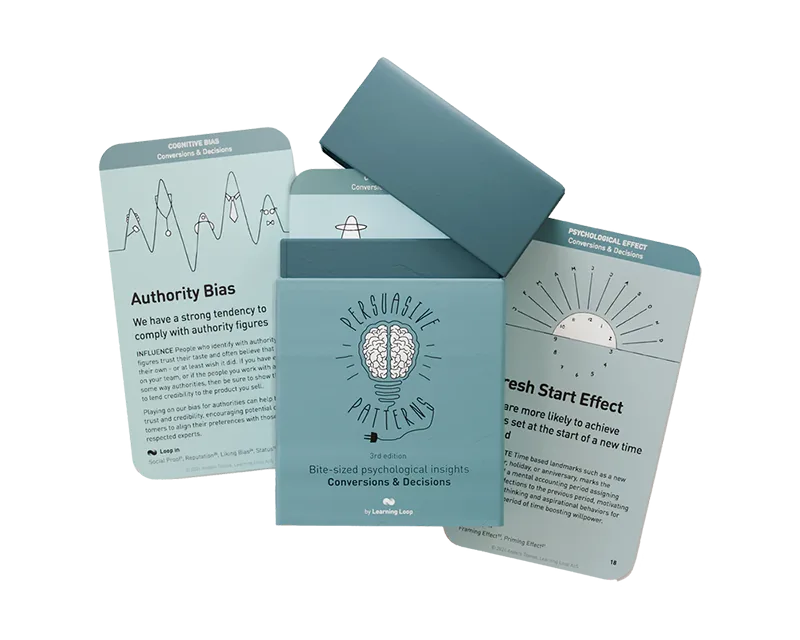
The Persuasive Patterns cards are a hands-on reference for exploring behavioral principles.
Persuasive Patterns by Learning Loop
Conversions & Decisions focuses on choices and barriers to action. Habits & Engagement focuses on engagement, repeat use and habit formation.
Use either deck to explore and discuss interventions. Neither deck replaces user research, an expert facilitator, a full behavioral science course or testing.
Explore the card decks Explore the free pattern playbookFor one diagnosed barrier, generate three deliberately different responses: one that removes friction, one that clarifies a decision and one that improves feedback. Describe why each might help and what could go wrong. Select ideas for testing based on evidence and potential user benefit.
A pattern suggests something to investigate; it does not establish that the proposed change will work.
3. Tools for facilitating behavioral design workshops
If several disciplines need to work on the same behavior, use a short workshop to create shared understanding before choosing a design direction. A simple 60-minute format is sufficient to begin:
Agree on one behavior, user goal and available evidence.
Identify possible capability, opportunity and motivation barriers.
Use a pattern library or cards to generate different interventions.
Document hypotheses, risks, next research steps and a test owner.
A facilitator or consultant is valuable when the team needs subject-matter expertise, independent challenge or support on a complex problem. Card decks support discussion; they do not provide expert judgment by themselves.
How are Persuasive Patterns cards used in real workshops?
On the Persuasive Patterns product page, David Di Sipio, Behavioral Design Researcher at Culture Amp, describes using the cards for a workshop on applying psychology to UI design:
“I used them to run a workshop on applying Psychology to UI design.”
Di Sipio reports that the cards helped participants understand the psychological insights through clear explanations. This is a practitioner's account of using the cards – not an independently measured outcome or a controlled study.
Example workshop: Painkillers and Vitamins
Suppose a product team finds that users want to complete onboarding but get stuck along the way. Rather than start with a favorite persuasive technique, the team can separate two questions: What is getting in the user's way? and What already helps them move forward?
Learning Loop's Painkillers and Vitamins exercise is built around those two questions. It uses Persuasive Patterns to explore possible ways to reduce barriers (“painkillers”) or reinforce existing enablers (“vitamins”). The original exercise is designed for a roughly two-hour session and can accommodate groups of different sizes.
Painkillers: remove barriers
Illustrative observation: Users don't understand what information a setup step requires. The team's hypothesis might be that clearer explanations reduce confusion; it would need to test that.
Vitamins: strengthen enablers
Illustrative observation: Users who see a useful project preview continue further. The team could investigate whether making that benefit easier to see helps others.
Where the cards fit: After identifying barriers and enablers from evidence, use the patterns as prompts for several possible interventions. Evaluate feasibility, user benefit and ethical risks before deciding what to test. The cards suggest options; they do not establish which option will work.
See the full Painkillers and Vitamins workshop instructions, including preparation, group activities and prioritization. This example focuses on when and why to choose the exercise rather than repeating its step-by-step instructions.
4. Tools for testing behavioral interventions
Choose an evaluation method based on the decision you need to make. There is no single test that suits every intervention.
Usability testing
Useful when you need to understand whether someone notices, understands or can complete a proposed interaction.
Prototype testing
Useful for early feedback on alternatives before investing in implementation.
Controlled experiments
Useful when a suitable experiment can estimate an intervention's effect on a measurable outcome.
Behavioral analytics
Useful for identifying patterns and monitoring outcomes, while recognizing that observational trends alone rarely establish causality.
The OECD BASIC toolkit describes a process of defining behavior, analyzing it, developing strategies, testing interventions and evaluating change. It was designed for public policy, but several principles transfer to product teams.
Measure not just conversion or engagement but also user understanding, control, long-term value and possible unintended outcomes.
How to choose between common behavioral design resources
These resources are complementary rather than interchangeable. The most important distinction is what decision each helps you make.
COM-B
Use when: You need to understand whether capability, opportunity or motivation is getting in the way.
Not for: Generating a ready-made interface solution.
Fogg Behavior Model
Use when: You want to investigate how motivation, ability and prompts interact at the moment of action.
Not for: Establishing causality without observing or testing users.
Persuasive Patterns playbook
Use when: You want to browse possible behavioral principles individually or share a link with teammates.
Not for: A structured degree-level introduction or a diagnosis on its own.
Persuasive Patterns cards
Use when: You want tangible prompts for comparing interventions or running an ideation discussion.
Not for: Replacing empirical research, testing or a facilitator.
Start with observation, use diagnostic frameworks to challenge your explanations, explore patterns only once you understand the task, and test any intervention. If the team needs to make those decisions together, see the behavioral design workshop guide.
Example: choosing tools for an onboarding problem
Suppose people sign up for a product but don't finish creating their first project. Here's how to combine tools without starting with a persuasion tactic.
- Observe: Review the funnel and watch a small number of onboarding sessions. Record where people struggle and what they say they're trying to do.
- Diagnose: Use COM-B to ask whether they lack instructions, access, confidence, opportunity or motivation. Keep hypotheses separate from findings.
- Explore: Review principles such as reduction, progressive disclosure or feedback. Use a pattern library or cards to compare approaches.
- Choose: Sketch alternatives, including a simpler setup flow and more explicit progress feedback. Consider whether the change benefits users.
- Evaluate: Test comprehension and task completion, then measure relevant product outcomes where feasible. Revisit the original explanation if results are weak.
This is an illustrative workflow, not a claim that any particular pattern will improve onboarding.
A one-page behavioral design worksheet
You can use this template without buying anything. Fill it out in a document or on a shared board before choosing an intervention.
From observation to test
- User goal and context: What is the person trying to accomplish?
- Observable behavior: What are they doing (or not doing), and when?
- Evidence: What have we directly seen or measured?
- Possible barrier: Is the issue capability, opportunity, motivation or something else?
- Intervention hypothesis: If we change ___, then ___ may happen because ___.
- Evaluation: What will we measure, including possible negative effects?
Example: “If we replace unclear setup terminology with a plain-language explanation, more first-time users may complete setup because they better understand the required action.” Test that hypothesis rather than assuming it is true.
A practical starter toolkit
If you're beginning to use behavioral design in product work, start with a small set of complementary resources:
- One diagnostic model: COM-B or the Fogg Behavior Model.
- One evidence source: Interviews, observation, usability research or product analytics.
- One ideation aid: A pattern library or card deck such as Persuasive Patterns.
- One evaluation method: A usability study, prototype test or controlled experiment.
- One shared record: A short document linking the behavior, evidence, hypotheses, intervention and result.
If your goal is to learn the underlying field before applying it, read the companion guide: How to learn behavioral design.
Frequently asked questions
What are the best behavioral design tools for UX designers?
Start with tools that fit your immediate job: a diagnostic model and user research for understanding behavior, a pattern library for exploring alternatives, and usability testing or experimentation for evaluation.
Are behavioral design cards useful without a course?
They can be useful as prompts and references for experienced product practitioners, but they're less suitable as a complete theoretical introduction. Pair them with research or structured learning where needed.
Can I use behavioral design tools in a remote workshop?
Yes. A digital pattern library and a shared collaboration board can support remote ideation. Printed cards are often easier to handle in an in-person session.
What is the difference between a framework and a pattern library?
A framework helps structure diagnosis or decisions. A pattern library offers possible design approaches. Both still require evidence and judgment.
Do I need a consultant?
Not for every problem. A practitioner can start with open frameworks, user research and small experiments. Specialist assistance is useful when stakes, complexity or methodological demands exceed the team's capabilities.