Product psychology is useful when you need to explain a behavior – not merely make an interface more persuasive. It helps teams investigate why people hesitate, abandon tasks, return to products, or struggle with decisions.
The practical sequence is straightforward: define the user goal, collect evidence, identify a possible behavioral mechanism, design alternatives and evaluate the result. The examples below show how to use that sequence during regular UX and product work.
A practical way to apply product psychology
Don't start with “Which cognitive bias should we use?” Start with what someone is trying to accomplish and what makes that difficult. Research can help you distinguish a comprehension issue from a motivation issue or a missing product benefit.
Define the behavior
Specify the user, their goal, the context and the action you can observe.
Investigate barriers
Use research and models such as COM-B to separate evidence from assumptions.
Explore alternatives
Use principles to generate different solutions, including simpler non-persuasive ones.
Test user outcomes
Measure understanding, task success and unintended effects alongside business results.
Important distinction: Psychological principles offer possible explanations. A design change based on them is still a hypothesis until evaluated with the people using your product.
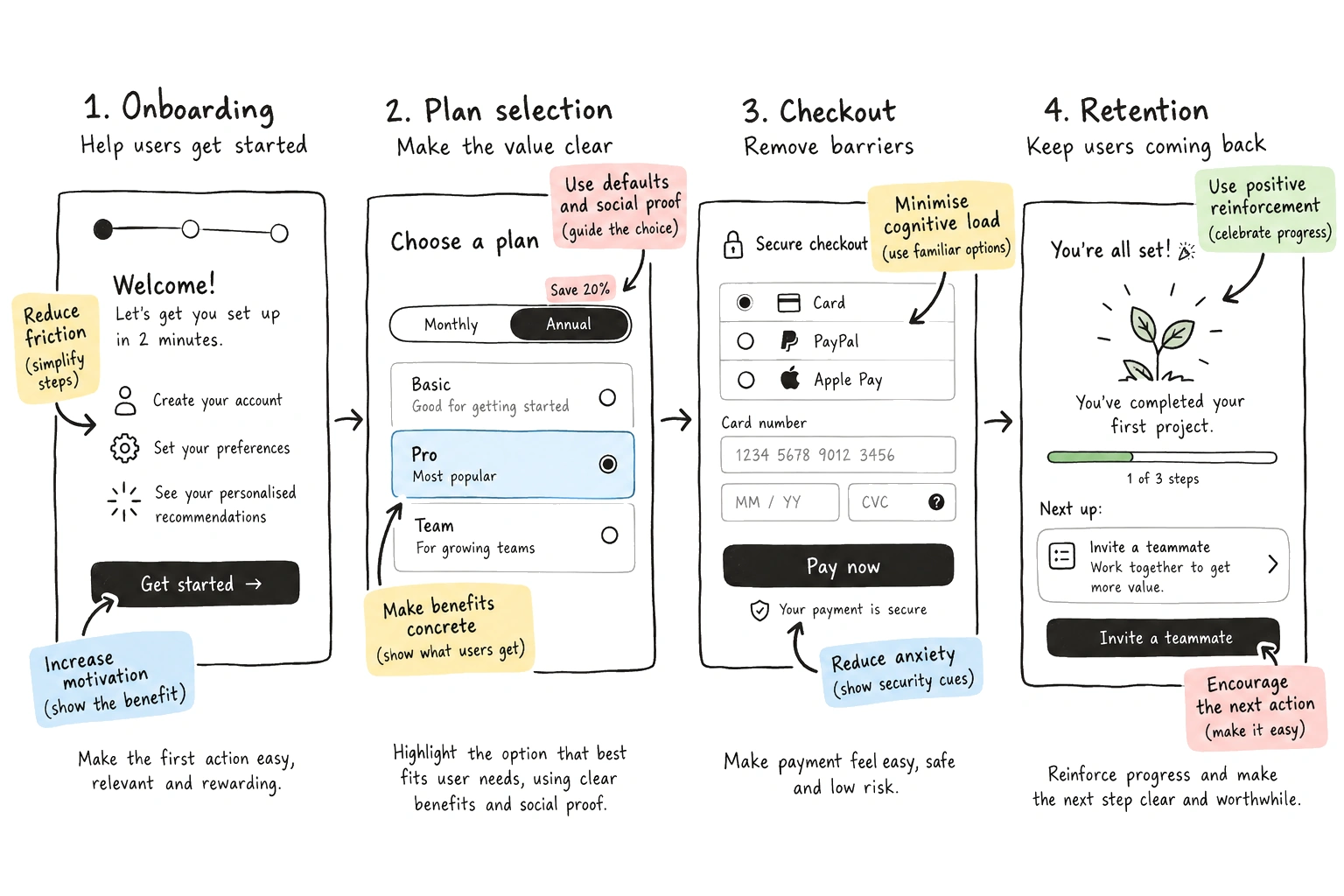
For a collaborative way to compare these hypotheses, use the behavioral workshop guide; to select a diagnostic model or intervention tool, use the tools guide.
Four common product problems, explored through psychological hypotheses
The situations below are illustrative scenarios, not case studies with measured results. Each shows a problem, a plausible mechanism and a way to test an intervention. The illustration above contains example interface ideas; they should not be interpreted as default recommendations. In particular, use truthful social proof, avoid steering people to an unsuitable plan and do not confuse repeat engagement with user benefit.
1. Users register but don't finish setup
Observe: People create an account but leave before their first project is ready. Interviews and usability sessions suggest that some do not understand the terminology on the setup screen.
Missing clarity or capability – not necessarily insufficient motivation. Too many unfamiliar choices may also increase effort.
Replace jargon with clear instructions; break a complex task into meaningful steps; show what a completed project will look like.
Evaluate: Observe whether new users can explain the task and complete it without help. Monitor completion and downstream project success.
Pattern prompts: reduction, chunking and feedback. Don't assume the solution is a progress bar.
2. Users struggle to choose between plans
Observe: Visitors compare several similar plans but cannot tell which differences matter for their needs.
Information is difficult to compare, or the product assumes knowledge the visitor doesn't have.
Present clear feature differences, define unfamiliar terms and let users compare plans against their actual use cases.
Evaluate: Check whether people can correctly identify the plan that fits their stated needs, not simply whether more choose the most expensive plan.
Related psychology: framing and anchoring can influence choices, so use pricing presentation transparently.
3. Users hesitate at checkout
Observe: People reach checkout but abandon the process. Some mention uncertainty about delivery or unexpected costs.
Uncertainty, low trust or missing information rather than a lack of persuasive messaging.
Reveal total costs earlier, explain delivery clearly and make support or return information easy to find.
Evaluate: Test understanding of price and delivery alongside checkout completion and support contacts.
Avoid fabricated urgency, invented scarcity or misleading social proof.
4. Users don't return after trying a feature
Observe: People use a feature once but rarely return. Some report that they don't know when it would be useful again.
The ongoing value isn't clear, or the feature simply doesn't solve a recurring problem for this user group.
Show useful outcomes of prior activity, help users set meaningful goals or improve discoverability at relevant moments.
Evaluate: Measure meaningful repeat use and self-reported value – not only sessions, notifications opened or time spent.
Pattern prompts: feedback loops, progress and cues. Avoid designing unnecessary dependency.
Quick reference: problem, possible approach and evidence
| User problem | Explore | Check |
|---|---|---|
| Confusing setup | Clarity and reduction | Task success |
| Hard plan choice | Comparison and framing | Decision quality |
| Checkout hesitation | Transparency and trust | Understanding + completion |
| Weak return use | Value and feedback | Meaningful retention |
Evaluate the user outcome, not just the click
A behavioral intervention can raise a product metric without improving the user experience. Before shipping a change, define both what the business wants to learn and what a good outcome looks like for the user.
| Intervention | Business signal | User safeguard |
|---|---|---|
| Shorter onboarding | Setup completion | Can users actually finish the task? |
| Clearer plan options | Plan selection | Is the selected plan suitable? |
| Checkout clarity | Completed orders | Are costs and terms understood? |
| Better return cues | Repeat usage | Does the return provide value? |
How UX designers and product managers use psychology differently
UX designers and researchers
Use psychology to form research questions, evaluate how information is presented, explore interactions and test whether experiences are understandable.
Typical output: Research insights, interaction alternatives and usability evidence.
Product managers
Use psychology to define observable outcomes, align the team on user barriers, prioritize hypotheses and assess trade-offs between user value and business goals.
Typical output: Behavior-focused problem statements, experiments and decisions.
Growth specialists, content designers and engineers can contribute too. The discipline works best when teams test shared assumptions rather than assigning all behavioral questions to one role.
Where behavioral pattern libraries and cards fit
A pattern library gives a team references to potential psychological mechanisms. Use it after defining the problem and reviewing available evidence, and treat each pattern as a prompt – not as a prescription.
Learning Loop offers a free playbook of 80 Persuasive Patterns for exploring principles individually. The card decks offer a physical or digital way to bring those principles into ideation sessions, design critiques and workshops.
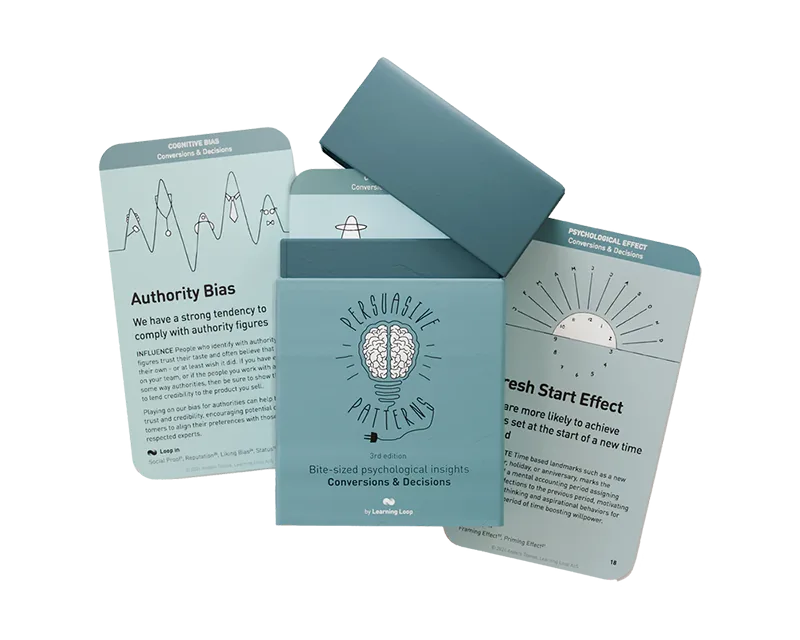
Persuasive Patterns card decks
Conversions & Decisions explores psychological principles for choices and action. Habits & Engagement explores engagement and repeated behavior.
The cards help practitioners compare ideas and work collaboratively. They do not replace diagnosis, research, ethical review or experimentation.
Explore the decksIf you need to choose a diagnostic framework or workshop format first, see Behavioral design tools and resources. For a learning roadmap, see How to learn behavioral design.
A checklist for your next product decision
- Who: Which users, in what context?
- Goal: What do they want to accomplish?
- Behavior: What happens now?
- Evidence: What have we observed, and what are we assuming?
- Mechanism: What might explain the behavior?
- Alternatives: What different interventions could help?
- Ethics: Will people benefit and retain control?
- Test: How will we know if it helps?
Frequently asked questions
What is product psychology in UX design?
It's the application of psychological knowledge to understanding and improving how people perceive, decide and act within product experiences. It complements usability, accessibility and user research.
Is product psychology the same as persuasive design?
No. Product psychology is broader: it can help teams understand behavior without necessarily trying to persuade users to do something. Persuasive design is more explicitly concerned with influencing actions or attitudes.
Which psychological principles should a product designer learn first?
Learn about attention, motivation, feedback, mental models and decision context. You can then explore concepts such as social proof, anchoring, choice presentation and loss aversion. Understanding limitations matters more than memorizing a long list.
Can psychology increase conversion rates?
Research-informed interventions may improve particular conversion outcomes, but effects depend on the product, users and context. Evaluate changes rather than assuming a psychological principle guarantees results.
How do I avoid manipulative design?
Be transparent about options, costs and consequences. Support meaningful user goals, preserve informed choices and monitor potential harm – not merely the action rate.