Price Anchoring
How the prices around your product change what it's worth
Turn small pricing changes into revenue with The Psychology of Pricing
A practical collection of 100+ research-backed pricing tactics for digital products, SaaS and e-commerce.
$49 · PDF book
Get the book!What does $10 buy you? It depends entirely on what’s next to it.
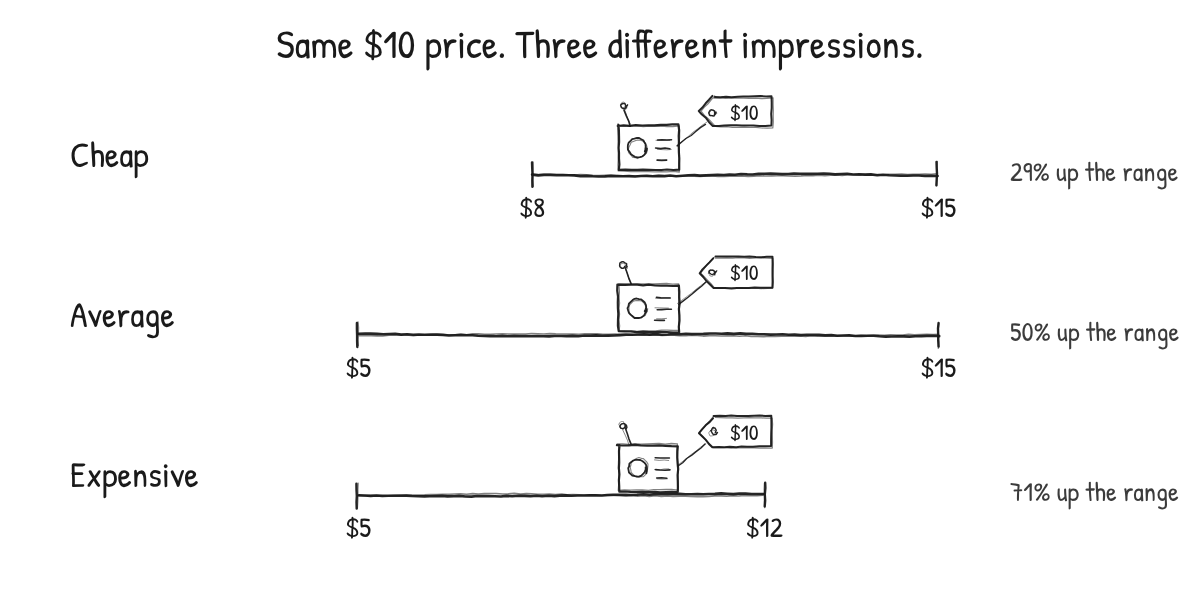
In a shop where everything costs between $8 and $15, a $10 gadget is one of the cheapest things on the shelf. Put the same gadget in a range from $5 to $12, and it’s suddenly one of the most expensive. The price hasn’t changed. The comparison has.
This is price anchoring, and it’s at work on every pricing page, product catalog and checkout flow, whether you designed for it or not. The question isn’t whether your customers are anchored. It’s whether the anchors they see help or hurt you.
What is price anchoring?
Price anchoring is the tendency for customers to judge a price by comparing it to a reference point (the anchor) instead of by its absolute value. The anchor can be a previous price, a competitor’s price, a more expensive plan, a suggested amount, or simply the first number a customer sees.
It’s an application of the anchoring bias (also described as a UI design pattern), first described by Tversky and Kahneman. In their classic experiment, people spun a wheel of fortune rigged to land on 10 or 65, and were then asked to estimate the percentage of African countries in the United Nations. Those who saw 10 guessed 25% on average. Those who saw 65 guessed 45% (Tversky & Kahneman, 1974).
Anchors don’t even need to be relevant. Ariely, Loewenstein and Prelec asked students to write down the last two digits of their social security number before bidding on products such as wine and computer accessories. Students with numbers in the top 20% bid between 216% and 346% more than students with numbers in the bottom 20% (Ariely et al., 2003).
If a random number can move willingness to pay that much, the prices you deliberately put next to your product certainly can. In our guide to charm pricing, we saw how much the number customers expect changes how a price ending feels. Anchoring is how that expectation gets set.
Customers judge prices against a range, not a single number
Most advice on price anchoring stops at “show a high price first”. The research suggests something more useful: customers judge a price by where it falls within the range of prices they can see.
Janiszewski and Lichtenstein called this range theory. The attractiveness of a price depends on its position between the lowest and highest prices in the customer’s frame of reference (Janiszewski & Lichtenstein, 1999). That’s why the $10 gadget can be:
- Cheap in a range from $8 to $15
- Average in a range from $5 to $15
- Expensive in a range from $5 to $12
This gives you two levers instead of one. If you can’t lower your price, you can raise the top of the range. Customers are more willing to pay for:
- a $50 ribeye on a menu with a $200 bottle of wine,
- a $200 projector next to a $5,000 projector,
- a $5,000 proposal presented next to a $25,000 option.
Kolenda also cites a study where customers looking at a catalog of eight cameras priced from $50 to $75 were willing to spend more when the catalog also contained a $600 camera.
Williams-Sonoma’s often-told story is a classic example: Its $275 bread maker reportedly started selling once a larger, roughly 50% more expensive model was placed next to it.
The aha: You don’t have to lower a price to make it feel lower. You can change the range around it. The expensive option doesn’t need to sell to do its job; it changes how every other option is perceived.
High anchors also push people to the middle
There’s a second reason why adding a premium option works: Many customers avoid extremes.
Simonson and Tversky found that adding a high-end option to a choice set shifts choices toward the option that now sits in the middle. In one of their studies, adding a premium camera made the mid-priced camera significantly more popular (Simonson & Tversky, 1992). They called it extremeness aversion, and it’s closely related to the decoy effect.
This is why so many pricing tables have three tiers. The top tier anchors the range, the bottom tier gives a safe entry point, and the middle tier is where most customers land.
When adding an expensive option backfires
Here’s the part most articles skip. Raising the top of your range doesn’t always make your prices look cheaper. Sometimes it makes them look more expensive.
Cunha and Shulman showed that customers can process a set of prices in two ways (Cunha & Shulman, 2011):
- Discrimination: Customers compare options to each other, looking for differences. Here, a high anchor creates contrast. Other prices look lower next to it.
- Generalization: Customers form an overall impression of the set (“is this an expensive shop?”). Here, a high anchor creates assimilation. It drags up the average, and every price seems higher.
Which mode customers are in decides which recommendation is right:
| How customers process your prices | What to do |
|---|---|
| Comparing options (discrimination) | Raise the endpoints of the range, for example by adding a premium option or raising your lowest price. |
| Forming an overall impression (generalization) | Lower the average of the range, for example by adding a cheaper entry option. |
Kolenda points out that this matters a lot for anyone selling variations of one product, such as SaaS plans. When customers see a single platform offered in different tiers, they are often in a summary mindset: They’re judging whether the product is expensive, not comparing products. In that case, an extreme enterprise tier may make your whole product look pricey.
The aha: The same expensive option can make your prices look cheaper or more expensive. What decides it isn’t the option itself, but whether customers are comparing your products or judging your brand.
Price anchoring examples you can apply
Delay the most expensive option for new customers
Existing customers already know your brand, so they compare options. For them, a $300 shirt makes a $65 shirt look reasonable. New customers are still forming an impression of what kind of store you are. In that mindset, the $300 shirt makes the whole store look expensive, including the $65 shirt. Consider leading first-time visitors to your core range, and introduce premium options once they’re comparing.
Add a small or free tier to a SaaS pricing page
Because SaaS customers often judge the platform as a whole, adding a low-cost or free entry plan can lower the perceived average and make every plan look more affordable. It also gives hesitant customers a lower-risk first step, which is the logic behind the freemium model. Free has its own psychology, though, which we cover in free trial vs. paid trial.
Anchor with a “Contact us” plan instead of a huge number
If you need an enterprise tier but don’t want a large number to drag up the average, a plan without a public price can still signal that there’s a bigger option above your main tiers, without putting a number into the comparison.
Raise the upper limit of sliders
When you let customers choose an amount with a slider, the range of the slider becomes the anchor. The way a slider is set up, including where it starts, shapes the answers people give (Thomas & Kyung, 2019). A tip, donation or pay-what-you-want slider from $0 to $1,000 suggests $500 as a reasonable choice. Extend it to $2,000, and the implied norm doubles.
Base upgrade asks on what customers already pay
Suggested amounts work as targets. Kolenda describes research on charity appeals where showing small costs (“$2 buys a mosquito net”) made people donate exactly that amount: A $3 net led to $3 donations, a $7 net to $7. Anchors that are too high don’t work either. In a letter sent to more than 190,000 donors, the best-performing request was set around 10% below each donor’s previous gift, which beat both a 50% lower ask and a 25% higher ask.
The same logic applies to upgrades, add-ons and renewals. Anchor your offer on what a customer already spends, and be careful about tiny “from $1” anchors. They might set the target you’ll be paid.
Multiply small anchors
If you need to show a small unit price, multiply it: “$10 provides five nets” encourages a bigger commitment than “$2 provides a net”. On a pricing page, “Less than $1 a day” invites customers to compare the price to a small daily expense instead of a large annual one, which is the framing effect and anchoring working together.
Expand the comparison set
Anchoring also applies to rankings. If you’re #2 in a list of five, you’re in the top 40%. If you’re #2 in a list of 100 tools, you’re in the top 2%. The facts are the same, but the reference set is not. The same goes for how you display scores: the format of a star rating changes how big the difference between products feels.
How to test price anchors
Anchors are context, so they’re best tested in context. Before you run an A/B test on your pricing page, work out:
- What anchors customers see today. Competitor prices, your old prices, a free alternative, the first number on the page, or the price on the ad that brought them there.
- Whether customers compare or summarize. Are they choosing between distinct products, or judging whether your one product is worth it? Your answer decides whether you should raise the top or lower the average.
- Which customers you’re designing for. New and returning customers may need different ranges.
- What success means. A premium anchor can increase average order value while slightly lowering conversion. Measure revenue per visitor, not just conversion rate.
Used well, anchoring helps customers understand the value of what they’re buying by giving them a meaningful point of comparison. Used badly, it invents comparisons that don’t exist, such as fake “original” prices. That’s where persuasion turns into manipulation, and it tends to backfire as soon as customers notice.
Go deeper into the psychology of pricing
Anchoring is one of the most powerful pricing levers, but it rarely works alone. It interacts with the decoy effect, with your overall pricing strategy, with how prices end (read our guide to charm pricing), and with the ways you can raise prices without losing customers. The Psychology of Pricing PDF book collects 100+ behavioral pricing tactics for pricing pages, plans and promotions, with the psychology behind each one, when to use it and how to test it.
- Tversky, A., & Kahneman, D. (1974). Judgment under uncertainty: Heuristics and biases. Science, 185(4157), 1124-1131.
- Ariely, D., Loewenstein, G., & Prelec, D. (2003). Coherent arbitrariness: Stable demand curves without stable preferences. The Quarterly Journal of Economics, 118(1), 73-106.
- Janiszewski, C., & Lichtenstein, D. R. (1999). A range theory account of price perception. Journal of Consumer Research, 25(4), 353-368.
- Simonson, I., & Tversky, A. (1992). Choice in context: Tradeoff contrast and extremeness aversion. Journal of Marketing Research, 29(3), 281-295.
- Cunha, M., Jr., & Shulman, J. D. (2011). Assimilation and contrast in price evaluations. Journal of Consumer Research, 37(5), 822-835.
- Thomas, M., & Kyung, E. J. (2019). Slider scale or text box: How response format shapes responses. Journal of Consumer Research, 45(6), 1274-1293.
- Add an Expensive Product to Catalogs by Nick Kolenda
- Raise Cost Minimums in Donations by Nick Kolenda