Prototype
A testable representation of a product idea, built to answer a specific question before committing to development

Prototype at a glance
- Type
- Method
- Also called
- Product Prototype and Design Prototype
- Metrics
-
3 relevant metrics to track
- Task completion without facilitator help
- Critical misunderstandings observed
- Recovery from errors
A prototype is a testable representation of a product, service, or feature, made to explore an idea and answer a specific question before committing to its full implementation. It might be a paper screen, a clickable interface, a physical model, or a small piece of functioning software.
A booking screen can look finished while leaving its most important question unanswered: will people understand what they have actually booked? A prototype makes that question observable. Its value comes from the decision it helps you make, rather than how closely it resembles a finished product.
What does a prototype do?
A prototype gives an idea enough form for someone to inspect, use, or respond to it. You can compare alternative designs, observe misunderstandings, or check whether a mechanism works before expanding the investment.
The GOV.UK Service Manual describes prototypes ranging from sketches to interactive code and recommends choosing the form that meets the current need. A useful consequence for product teams is to start with a question rather than a preferred tool.
Write that question as a decision: “If customers cannot distinguish a provisional appointment from a confirmed booking, we will change the flow before implementing payments.” This gives the prototype a purpose and a stopping point.
Prototype types and fidelity
Fidelity describes how closely a prototype represents the intended experience. It can vary across appearance, interaction, content, and functioning behavior. A polished screen may contain placeholder information and no working logic; a plain coded form may handle realistic errors.
Kara Pernice’s guide to prototype fidelity distinguishes visual detail, interactivity, and content. Treat these as choices you can make separately.
| Prototype type | Useful when you need to learn about | What it usually leaves untested |
|---|---|---|
| Paper prototype | Labels, screen order, information priorities, alternative layouts | Actual device behavior and system responses |
| Clickable prototype | Navigation, a particular task flow, expectations between screens | Real business logic, integrations, and unprepared paths |
| Working prototype | A functioning interaction, calculation, integration, or physical mechanism | Production readiness and behavior at scale |
| LEGO prototype or other rough physical model | Spatial arrangements, physical concepts, and discussions about a service or object | Material performance, durability, and manufacturing constraints |
These are overlapping approaches. A clickable prototype can be visually rough. A physical model can include a working mechanism. The header illustration shows the same appointment-booking task as paper, clickable screens, and a working version; these are alternatives for different questions, rather than mandatory stages.
How to choose the right prototype
Ask what must be real for the observation to be meaningful? Then build that part and simplify the rest.
For a question about wording, realistic content may matter more than visual polish. For a question about choosing dates, the relevant calendar interactions must respond. For a question about conflicting appointments, prepared screen links cannot replace scheduling logic.
Some questions call for a service prototype rather than more screens. A manual concierge can coordinate appointments on a customer’s behalf to investigate whether the service is useful before automating it. That can reveal delivery work and customer reactions, but not whether automation will scale. A technical spike instead investigates a focused implementation question, such as whether a calendar integration supports the required reservation behavior. The second illustration contrasts these choices with a clickable navigation test.
Use this sequence:
- Name the uncertainty. Write one assumption that could change the product decision.
- Identify the observation. Specify what someone would do, misunderstand, or be unable to complete if the assumption were wrong.
- Choose the necessary realism. Decide which interactions, content, data, and physical properties must be represented.
- Limit the scope. Build the task and the important alternatives or error paths. Record what is absent.
- Choose the next decision. Decide what would make you revise, investigate further, or proceed to another kind of test.
IDEO.org’s Rapid Prototyping method emphasizes making ideas tangible, testing critical elements, and recording findings across iterations. You can use the experiment sheet to make your assumption, observation, and decision threshold explicit before building.
Worked example: booking an appointment
The following scenario and observations are illustrative, rather than results from a real study.
A team is designing an appointment-booking service for a repair business. Customers choose a service, select a time, review the price, and confirm. The team worries that people will assume selecting a time completes the booking, even though a final confirmation is required.
Start with the risky misunderstanding
The initial question is: “Can customers tell when their appointment is confirmed?” The team draws the selection, review, and confirmation screens on paper. A facilitator swaps screens in response to the participant’s actions.
The task is concrete: “You need a repair appointment next Tuesday afternoon. Arrange a visit and tell us when you would expect the repairer to arrive.” It avoids telling the participant which buttons to use.
Suppose a participant stops at the review screen and says the appointment is booked. The team records the visible screen, the action that preceded it, and the person’s explanation. This reveals a mismatch worth investigating; it does not yet reveal how frequently it occurs across all customers.
The team changes “Your appointment” to “Review your appointment” and makes the final action explicit. It then tries the revised flow with new participants. The learning concerns confirmation language and sequence, so there is no reason yet to build live scheduling.
Make the interaction real when the question changes
Next, the team wants to observe whether people can move between dates without losing their selected service. It creates a clickable version with realistic times, a back path, and a no-availability state.
Later, an engineering question appears: “What happens when two people try to reserve the same slot?” This requires a working model of reservation behavior and a deliberately constructed conflict. A successful click through a prepared confirmation screen would provide no evidence about that issue.
| Observation in this example | Reasonable next action | Conclusion it cannot support |
|---|---|---|
| A participant mistakes review for confirmation | Revise the state labels and retest comprehension | A forecast of booking conversion |
| A participant loses their selection when going back | Change the flow and test recovery | Proof that the scheduling backend works |
| The working model double-books a slot | Investigate reservation handling | Evidence that customers want the service |
The prototype is useful because each version exposes a different uncertainty. Adding realistic colors to the paper screens would not answer the concurrency question.
How to test and interpret a prototype
Before a session, write the research question, recruit people whose situation fits it, and check that the task can be attempted without an accidental dead end. Include the device and access needs relevant to the experience you are investigating.
The GOV.UK guide to moderated usability testing recommends believable tasks with clear goals that do not hint at the answer. Explain that the design is being tested, then observe the participant trying to achieve the goal.
Separate three kinds of note:
- Observation: what the person did or said, with the relevant screen or condition.
- Interpretation: your explanation of what might have caused it.
- Decision: what to change or investigate, and what evidence is still missing.
Record facilitator help and prototype failures. If a researcher explains where to click, distinguish that assisted completion from independent success. If the prototype breaks, establish what failed before attributing the problem to the design or participant.
Look for concrete behavior alongside opinions. IDEO.org’s Get Feedback guidance warns that people may praise a prototype out of politeness. “I like it” is useful conversation, but watching someone complete a relevant task provides a different kind of evidence.
Afterward, summarize what you learned, what remains uncertain, and the next decision. A small qualitative study can identify problems and explanations; it does not by itself estimate a reliable population conversion rate. Link the findings to your broader product experimentation plan.
Prototype vs. MVP, mockup, and proof of concept
The labels overlap in practice. Define the purpose of the artifact rather than assuming its name establishes what it can prove.
| Term | Main purpose | Example for the booking service |
|---|---|---|
| Mockup | Represent appearance or layout | A static image of the appointment screen |
| Prototype | Explore or test a particular experience or behavior | A booking flow used to investigate confirmation errors |
| Proof of concept | Investigate whether a technical approach is feasible | A small test connecting to a scheduling provider |
| Minimum viable product (MVP) | Begin learning about a product or business hypothesis through a minimal product experiment | A narrowly scoped booking service offered to a defined customer group |
The Lean Startup methodology connects an MVP with the build-measure-learn cycle. An MVP is not simply a more polished prototype, and it need not be a broadly launched software release. A prototype may contribute to an MVP experiment when its use provides the relevant evidence. Clicking through a simulation alone cannot establish willingness to pay or sustained use.
Limitations and common mistakes
Realistic appearance creates expectations. If a booking looks complete but sends no confirmation, make the research context clear. Treat a simulation as a simulation when interpreting its results.
Missing paths distort behavior. A prototype containing only the intended route can hide what happens when someone changes their mind, enters unexpected information, or needs assistance. Include the alternatives essential to your question.
Usability is only one uncertainty. Understanding a service does not establish demand, viable economics, or technical feasibility. Choose additional experiments for those questions.
A working prototype is not automatically safe to ship. GOV.UK explicitly distinguishes prototype code from production code. Before reuse, assess the implementation against the reliability, accessibility, security, and operational needs of the real service.
Polish can outlast its usefulness. Set a decision point before building. Keep or discard the artifact according to what you still need to learn, rather than the effort already spent on it.
Common questions about prototypes
Does a prototype have to work?
It must support the activity you want to observe. A facilitator can make paper screens respond during a comprehension test. A test of an actual calculation or mechanism needs that behavior to function.
Should you always start with low fidelity?
Start with the least effort that preserves the conditions needed for your question. Some questions need realistic interaction or physical behavior immediately; others can be investigated with a few sketches.
How many prototypes should you make?
Make enough to examine the important alternatives and uncertainties. Several rough alternatives may help compare directions; one focused working model may be appropriate for a technical question. There is no universal count.
Can a prototype validate a product idea?
It can provide evidence about specific assumptions under the conditions tested. State those assumptions explicitly and avoid treating a successful session as proof of market demand or product-market fit.
Get a head start
The experiment sheet forces you to make critical factors explicit: What needs to be true for your idea to work, how success and failure looks like, how you are going to test your hypothesis, what you are going to measure.
Grab the 'Experiment sheet'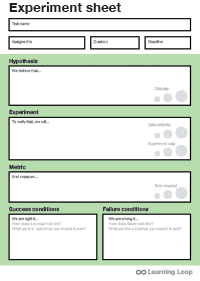
Visual examples
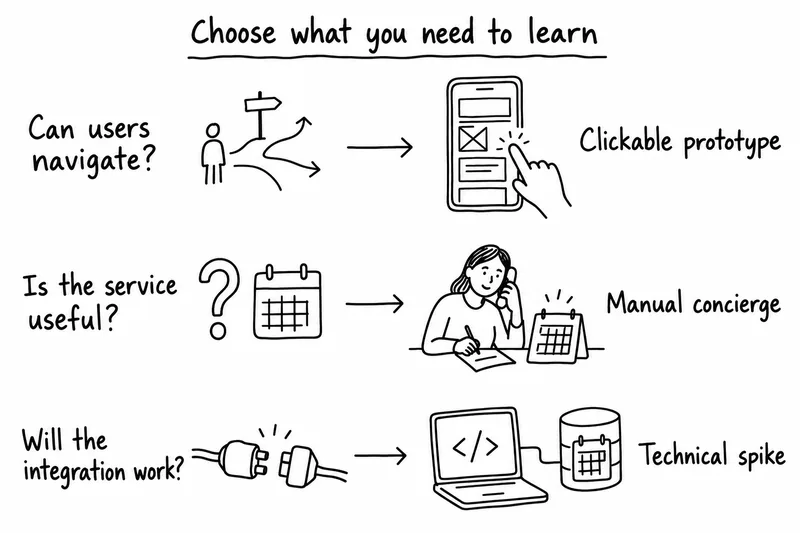
Match the uncertainty to a prototype: clickable screens for navigation, a manually delivered service for usefulness, and a technical spike for an integration question.
-
What decision will this prototype help us make?
Hint Name the decision before building. The result should change what you build, test, or investigate next. -
Which parts must behave realistically for this test?
Hint Match realism to the question. A realistic appearance cannot substitute for a working interaction when that interaction is what you need to test. -
What will remain uncertain even if the session goes well?
Hint Record what the prototype does not test, such as willingness to pay, repeat use, system capacity, or the full service experience.
You might also be interested in reading up on:
Product Weekly · Curated by Anders Toxboe
Sign up for the Product Weekly newsletter.
Join 40,000+ product people who get a weekly selection of useful reads on building digital products, plus new Learning Loop resources and occasional product updates.
What will I receive?Takes 10 seconds. Free to subscribe, unsubscribe at any time. Privacy policy.