Product Management, User Experience
User Onboarding
Everything that shapes whether a new user reaches value and keeps coming back
User Onboarding at a glance
- Type
- Concept
- Also called
- Product onboarding and App onboarding
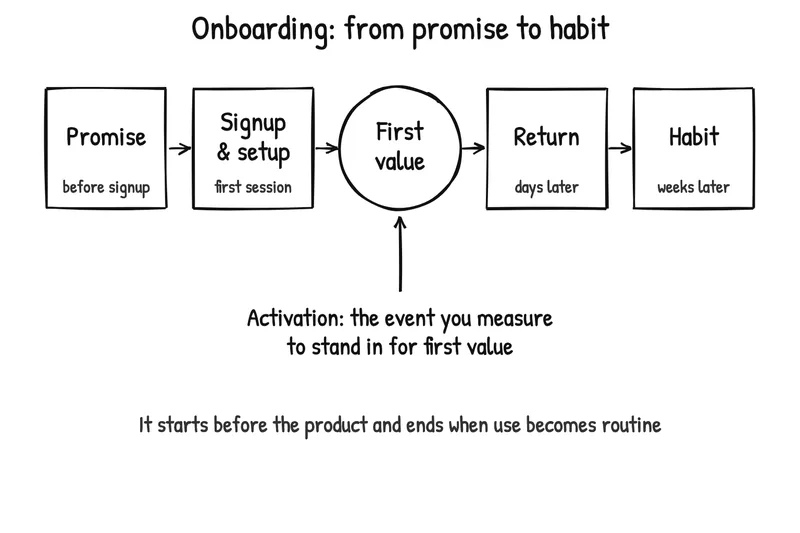
User onboarding is everything that shapes whether a new user reaches value and keeps coming back, from the promise they see before signing up, through signup and setup, to the point where the product has become part of how they work.
In many teams, onboarding means the welcome tour: a few tooltips and a checklist after signup. That narrower view misses most of what decides whether someone stays. The promise on a landing page sets what users look for inside the product, and a good first session is fragile until it turns into a second one.
First value, activation and setup
Three terms are easy to mix up, and the difference decides what a team optimizes for:
| Term | What it is | Example for a booking app for fitness coaches |
|---|---|---|
| Setup | The steps needed before the product can do anything useful | Adding a photo, session types and opening hours |
| First value | The moment the user experiences what the product is for | A client books a session through the coach’s link |
| Activation | The measured event a team uses to stand in for first value | “First booking received within 7 days of signup” |
Setup is a means, not a goal: every step that doesn’t move the user towards first value is a cost. Activation is useful when it tracks first value closely, and misleading when it doesn’t. “Completed the tour” or “reached the dashboard” are easy events to count, but they say nothing about whether the product did its job.
How onboarding works: the MCC model
Users who want a product still fail to start it, often because the request arrives at the wrong moment. Learning Loop’s onboarding series explains this with the MCC model: a user acts when three conditions line up at the same moment.
- Motivation: why the user wants to act, and how strongly.
- Capability: whether they are able to take the required action.
- Context: whether their current situation allows the action to happen now.
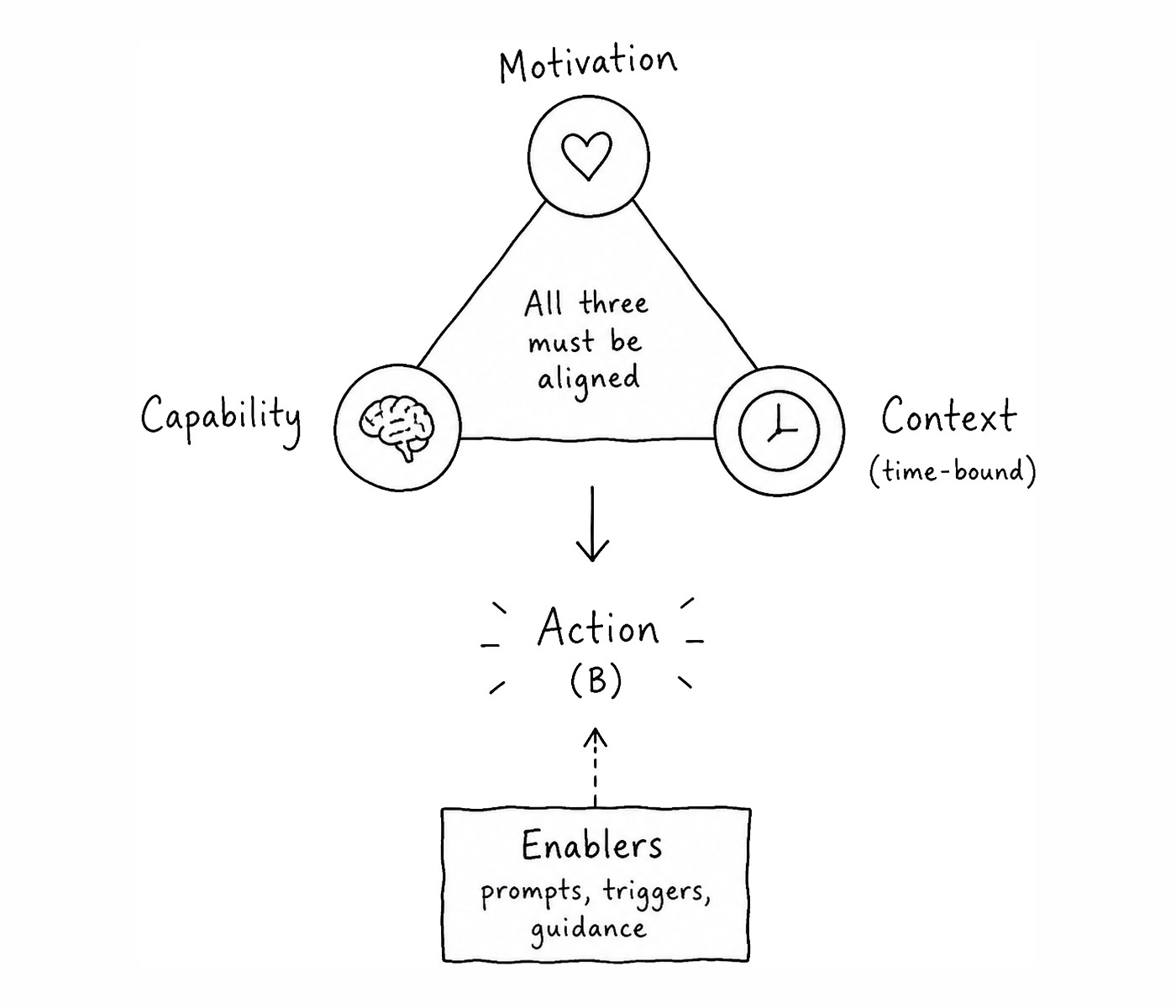
All three conditions make an action possible, but a user can still get distracted before acting. Enablers, such as prompts, a clear next step or a way to resume later, turn that possible moment into an actual action before the window closes.
The model brings together B. J. Fogg’s behavior model, in which a behavior happens when motivation, ability and a prompt come together, and the COM-B model from behavioral science, which adds the opportunity created by a person’s surroundings. MCC gives context its own place, because in onboarding a capable, motivated user with two spare minutes still can’t finish a twenty-minute setup.
When onboarding fails, one of the three conditions is usually missing, and each calls for a different fix:
| What you observe | Likely missing condition | Typical fix |
|---|---|---|
| Users sign up but never start | Motivation | A clearer promise that matches why they came |
| Users start setup but abandon a step | Capability | Fewer, simpler steps, good defaults, sample data |
| Users mean to finish “later” and don’t | Context | Let them finish in a smaller window, or bring them back at a better moment |
The limiting condition also shifts over time. Before signup, it is usually motivation; in the first session, capability and context; after day one, mostly context. A Behavioral Model of User Onboarding explains the model in full, and Self-Determination Theory explains why some motivation lasts and some doesn’t.
A worked example: tour completed, value missed
This example is hypothetical. The product and numbers are invented to show the reasoning, not taken from a real company.
A booking app for fitness coaches launches with a welcome screen and an eight-step product tour. The team tracks tour completion: 78% of new coaches finish it. They are puzzled that so few coaches stay.
When they look at the outcome instead, only 18% of new coaches receive a booking within their first week. The tour shows every feature, then leaves coaches in front of an empty calendar. Most of them haven’t shared a booking link yet, and the value of the product only arrives when a client books.
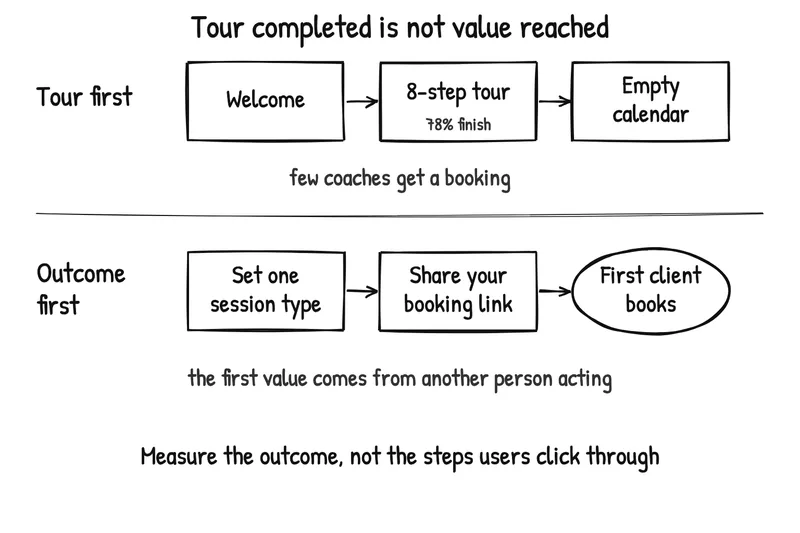
The team redesigns onboarding around the outcome:
- Ask only for what the first booking needs: one session type and the coach’s available hours. Photos and policies can wait.
- Make the next step obvious: the coach’s booking link appears straight away, with one-tap sharing to the channels they already use with clients.
- Redefine activation as “first booking received within 7 days”, and stop reporting tour completion as success.
- Test it: half of new coaches get the new flow, half the old one. After four weeks, 31% of new-flow coaches have received a first booking within a week, against 18% for the old flow.
The team doesn’t stop there. A first booking is first value, but whether coaches stay depends on the second and third bookings, so they also compare 30-day retention between the two groups.
Onboarding across the lifecycle
Onboarding has different jobs at different stages. Each has its own article in Learning Loop’s series:
- Before the product: the promise decides what users look for after signup. See User Onboarding Starts Before the Product.
- The first experience of value: design for the moment it clicks. See User Onboarding and the Moment It Clicks.
- The shortest path to action: reduce friction and time commitments. See User Onboarding and the Shortest Path to Action.
- Beyond day one: turn a first win into ongoing use. See User Onboarding Beyond Day One.
- From repeat use to habit: see User Onboarding and the Shift From Repeat Use to Habit.
- From one user to many: invitations, sharing and team adoption. See Onboarding as a product-led growth multiplier and product-led growth.
- Guidance that doesn’t create dependency: see Guided Interaction in User Onboarding.
- Onboarding that adapts to each user: see The End of Static Onboarding.
- AI products: onboarding for trust, control and calibration. See Onboarding Users to AI Products.
- Evaluation: see Evaluating Onboarding Experiences.
For concrete interface solutions, from guided tours and checklists to blank slates and sample data, browse the onboarding design patterns on UI-Patterns.com.
How to measure onboarding
Start with the outcome onboarding should create, then choose the behavior that shows it and the metric that captures that behavior. Three questions cover most of what matters:
| Question | Useful signals |
|---|---|
| Did users reach meaningful value? | Activation defined around first value, first meaningful action, a useful output |
| Did they reach it with acceptable effort? | Time to first value, steps and sessions before value, errors, help requests, abandonment |
| Did it change what they did next? | Second-session return, retention at day 1, 7 and 30, repeat use of the key workflow |
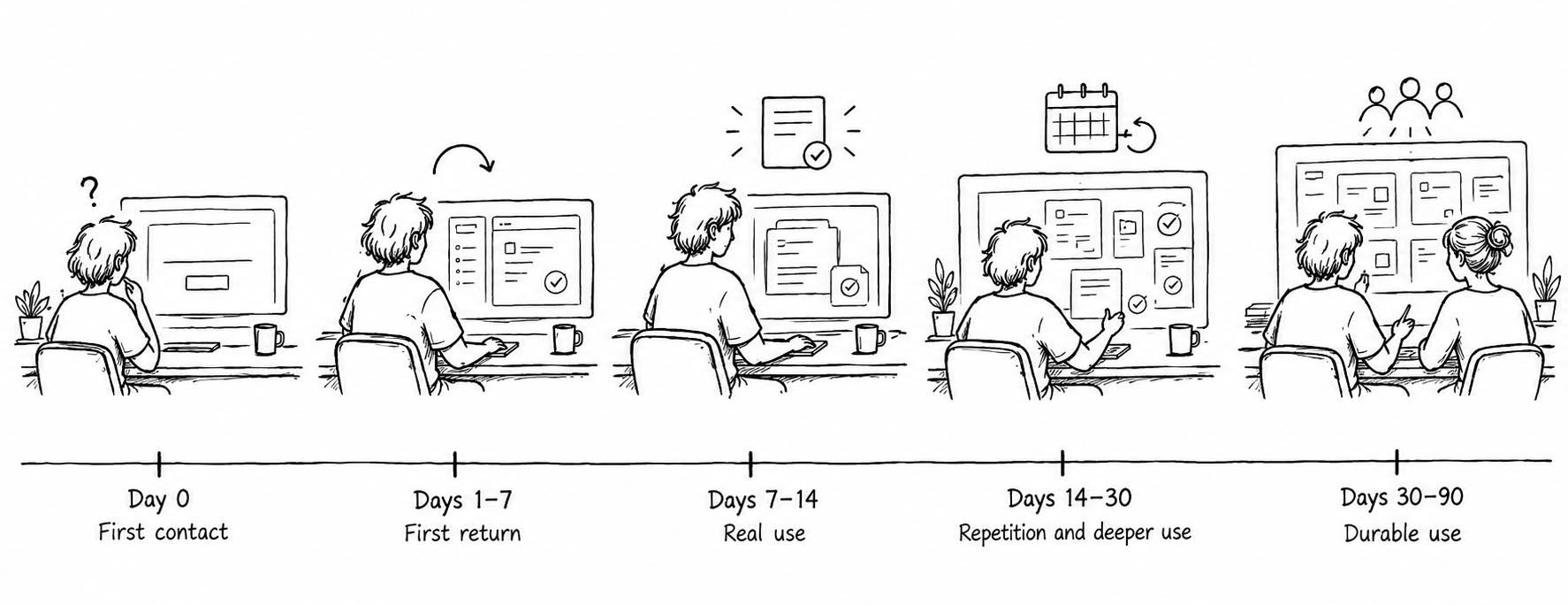
Different progress should become visible in different windows: contact with value on day 0, a first return in the first week, real use in the second week, repeated or deeper use within the first month, and durable use, sometimes with team adoption, by the third month. Where users drop off tells you what failed: leaving after the first session points to value, leaving after the second or third to a missing reason to return.
No single metric is enough. A high activation rate with poor retention suggests users reached something that gave them no reason to return; strong retention with many support questions suggests a valuable product that is hard to use. Behavioral data also needs interpretation: someone can complete an action without feeling its value, so talk to users as well. For a way to choose user-experience metrics more broadly, see the HEART framework.
Common mistakes
- Treating the tour as the onboarding. Tour completion measures attention to the tour, not progress towards value.
- Defining activation too early. An event chosen because it’s easy to log, such as signup or reaching the dashboard, makes the numbers look better without making onboarding work.
- Asking for everything up front. Every setup step competes with the first result. Ask for what first value needs and defer the rest.
- Fixing the wrong condition. A clearer promise won’t help someone stuck on a confusing form, and a simpler form won’t help someone with two minutes on a train.
- Stopping at day one. Most of the work of turning a new user into a regular one happens after the first session.
- Designing one path for everyone. Users arrive with different goals, skills and situations; onboarding that adapts to them usually beats a single fixed sequence.
The book: Psychology of Onboarding
Anders Toxboe is turning this series into a book, Psychology of Onboarding: A Behavioral Guide to User Activation and Retention, to be published by Learning Loop as a PDF. It collects and expands the articles above around the MCC model, and adds a library of onboarding UI design patterns, practical onboarding tactics, and a principles-and-checklist chapter for reviewing your own product.
The book isn’t available yet. Sign up for Product Weekly below to hear when it is.
-
What is the first value of your product, in your users' own words?
Hint Name the moment users experience what the product is for, such as the first invoice paid or the first booking received. If you can't, your onboarding has no clear destination. -
Is your activation event close to first value, or just close to signup?
Hint "Created an account" or "finished the tour" is easy to count but says little. Define activation as the measurable event that sits as close as possible to the moment users recognize value. -
When users stall, which condition is missing?
Hint Use the MCC model. If users don't want to continue, look at motivation; if they can't, look at capability; if they can't right now, look at context. Each needs a different fix. -
Does onboarding end after the first session?
Hint No. A first success is fragile until it turns into a second session, a routine and a habit. Plan for what brings users back after day one. -
Is a product tour bad?
Hint Not necessarily. A tour that helps people reach a result can work. The problem is treating tour completion as success when users finish the tour without reaching value. -
How do you know if onboarding works?
Hint Ask three questions: did users reach meaningful value, did they reach it with acceptable effort, and did it change what they did next? Measure each one, not just the first.
You might also be interested in reading up on:
- Fogg, B. (2009). A behavior model for persuasive design. Proceedings of the 4th International Conference on Persuasive Technology, 1-7.
- Michie, S., van Stralen, M. M., & West, R. (2011). The behaviour change wheel: A new method for characterising and designing behaviour change interventions. Implementation Science, 6(1), Article 42.
- A Behavioral Model of User Onboarding by Anders Toxboe
- Evaluating Onboarding Experiences by Anders Toxboe
- Onboarding design patterns by UI-Patterns.com
Product Weekly · Curated by Anders Toxboe
Sign up for the Product Weekly newsletter.
Join 40,000+ product people who get a weekly selection of useful reads on building digital products, plus new Learning Loop resources and occasional product updates.
What will I receive?Takes 10 seconds. Free to subscribe, unsubscribe at any time. Privacy policy.